



 Shopping Cart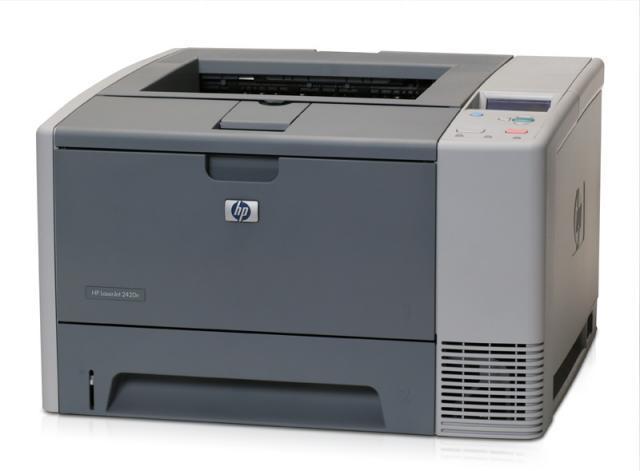



*** ALL TONERS AND SUPPLIES ARE IN STOCK AT DISCOUNTED PRICING , CALL +18882983095.
All reconditioned printers do not include supplies - toners , drums (Imaging Units) (where applicable) , printer cables , manuals , consumables, trays (where applicable). Power cables are included. Drivers can be downloaded from the manufacturers website. Please verify that drivers available are compatible with your software on the manufacturers site.
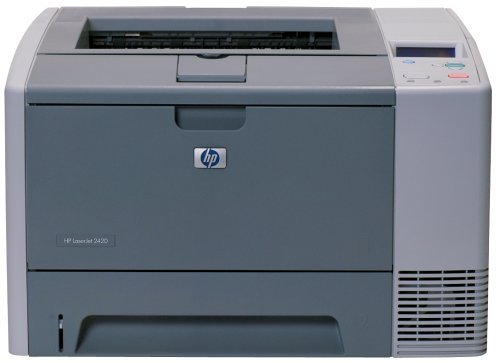
Images are for illustration purposes only and do not necessarily reflect the actual product.Product Details
Specifications
Accessories
Reviews
Product Details
Overview
Experience high quality output and flexible features with this great value monochrome LaserJet printer. It enables fast print speeds up to 33 ppm with user-friendly design and maximises productivity with its network management tools.
Main Features
- First page out in 10 seconds
- Print Speed: Up to 30 ppm Black
- Resolution: Up to 1200 x 1200 dpi
- Network Ready
- Paper Handling: 350 Sheet Input Capacity Consists of:
- 1 x 100 Sheet Multipurpose Tray
- 1 x 250 Sheet Input Tray
- Connectivity: USB, Parallel, and 10/100 Base-TX Ethernet
- Environment: Mac and PC Compatible
- Memory: 64 MB (expandable to 320 MB)
All out reconditioned printers are clean, tested and working.
Specifications
General Specifications
| Pricing | |
|---|---|
| Part Number | Q5958A#425 |
|
Interfaces/Ports | |
| USB | Yes |
| Parallel Port | Yes |
|
General Information | |
| Manufacturer | Hewlett-Packard |
| Manufacturer Part Number | Q5958A#425 |
| UPC Code | 43212105 |
| Brand Name | HP |
| Product Name | LaserJet 2420N Printer |
| Marketing Information |
Experience high quality output and flexible features with this great value monochrome LaserJet printer. It enables fast print speeds up to 28 ppm with user friendly design and maximises productivity with its network management tools. |
| Product Model | 2420N |
| Product Type | Laser Printer |
| Manufacturer Website Address | http://www.hp.com |
| Product Line | LaserJet |
| Product Series | 2400 |
|
Memory | |
| Standard Memory | 64 MB |
| Maximum Memory | 320 MB |
|
Miscellaneous | |
| Additional Information |
|
|
Network & Communication | |
| Ethernet Technology | Fast Ethernet |
| Ethernet | Yes |
|
Physical Characteristics | |
| Height | 10.2" |
| Width | 16.7" |
| Depth | 15.7" |
| Weight (Approximate) | 575.04 oz |
| Form Factor | Desktop |
|
Media Handling | |
| Media Handling | 1 x Input Tray 250 Sheet, 1 x Multipurpose Tray 100 Sheet, 1 x Output Bin 250 Sheet |
| Standard Input Media Capacity | 350 sheets |
| Number of Input/Multipurpose Trays Installed | 2 |
|
Processor & Chipset | |
| Processor Speed | 400 MHz |
|
I/O Expansions | |
| Expansion Slots | 1 x EIO |
|
Technical Information | |
| Platform Supported | PC, Mac |
| Maximum Mono Print Speed (ppm) | 28 |
| Duplex Printing | Manual |
| Maximum Print Resolution | 1200 x 1200 dpi |
| Print Color | Monochrome |
|
Reliability | |
| Duty Cycle | 75000 pages per month |
|
Fonts & Emulation | |
| Language Emulation | PCL 6, PCL 5e, PostScript 3, PDF v1.3 |
 Download Manufacturer Specifications
Accessories

Reviews


Printer not working? The printer memory could be full and not getting prints or the prints may be stuck in the print queue. Turn-off the printer, wait a few seconds and turn it back on.
Is your printer smearing immediately after changing a cartridge? Check that the protective tape over the nozzles is completely removed.
Store your laser printer in a properly ventilated area where temperature and humidity do not change frequently. Avoid areas with heavy dust buildup.
MY ACCOUNT
INFO & POLICIES
SHOP EASY
PAYMENT OPTIONS



