



 Shopping Cart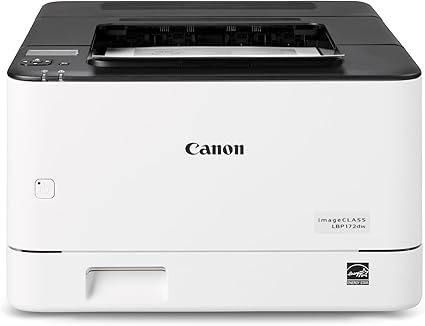

*** ALL TONERS AND SUPPLIES ARE IN STOCK AT DISCOUNTED PRICING , CALL +18882983095.
Printers do not include supplies - toners , drums (Imaging Units) (where applicable) , printer cables , manuals , consumables , trays (where applicable). Power cables are included. Drivers can be downloaded from the manufacturers website. Please verify that drivers available are compatible with your software on the manufacturers site.
Images are for illustration purposes only and do not necessarily reflect the actual product.Product Details
Specifications
Accessories
Reviews
Product Details
Main Features
- Print Speed: 35 pages per minute
- Maximum Resolution: 1200 x 1200 dpi
- Automatic two-sided printing
- Supports 8.5 x 14" Legal Paper
- 5-Line LCD Screen
- 250 Sheet Input Tray
- WiFi, USB, & Ethernet Connectivity
Specifications
General Specifications
| Functions | |
| Printing Technology | |
| Color Type | |
| Print Resolution | |
| Media Sizes | |
| Wireless | |
| Power Source |
 Download Manufacturer Specifications
Accessories

Reviews


Don't move a print head unless the instructions direct it. You can damage the belt or other parts.
Paper jam? The best way to remove jammed paper is to gently pull the paper in the direction of the paper path - with power off, of course. Do not pull the paper backwards - you could damage your printer forever by doing so.
Position your laser printer on a sturdy and level surface, allowing enough space around the printer for air flow.
MY ACCOUNT
INFO & POLICIES
SHOP EASY
PAYMENT OPTIONS



