



 Shopping Cart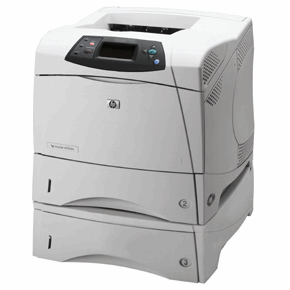

*** ALL TONERS AND SUPPLIES ARE IN STOCK AT DISCOUNTED PRICING , CALL +18882983095.
All reconditioned printers do not include supplies - toners , drums (Imaging Units) (where applicable) , printer cables , manuals , consumables, trays (where applicable). Power cables are included. Drivers can be downloaded from the manufacturers website. Please verify that drivers available are compatible with your software on the manufacturers site.
Product Details
Specifications
Accessories
Reviews
Product Details
Main Features
- Laser Printer
- Automatic duplexing
- Network enabled
- Extra paper tray
- 35 pages per minute print out
- 1200 dpi resolution
Specifications
General Specifications
| Manufacturer | Hewlett-Packard Development Company, L.P |
| Product Type | Network Printer |
| Print Technology | Laser |
| Print Speed | 35 ppm Monochrome |
| Print Resolution | 1200 x 1200 dpi Monochrome |
| Standard Memory | 64MB DIMM |
| Interfaces/Ports | Parallel IEEE 1284 Bi-directional Standard |
| Network Connectivity | Hewlett-Packard Jetdirect 615n 10/100Base-TX RJ-45 Standard Token Ring Optional Connectivity Card for USB, Serial and LocalTalk Optional |
| Media Types | Plain Paper(s), Letterhead, Prepunched Paper, Bond Paper, Color Paper, Preprinted Paper, Recycled Paper, Transparencies, Label(s), Envelope(s), Card Stock |
| Media Sizes | Letter, Legal, Executive, Envelope No. 10, Monarch Envelope |
| Pages Per Month | 150000 |
 Download Manufacturer Specifications
Accessories

Reviews


After installing a printer, go to the Windows dialog box and check the settings, so you won't be surprised by what happens the first time you print.
Most printers will beep once or twice during or after initialization. If it beeps more than that or beeps constantly, it is telling you that something is wrong. Most printers beep when out of paper or out of ink.
Be sure that you are printing on the 'right' side of the paper - that is - the coated side.
MY ACCOUNT
INFO & POLICIES
SHOP EASY
PAYMENT OPTIONS



