



 Shopping Cart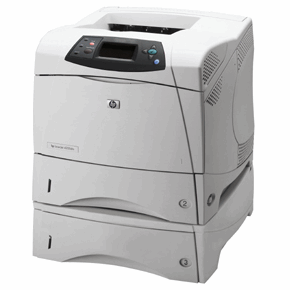

*** ALL TONERS AND SUPPLIES ARE IN STOCK AT DISCOUNTED PRICING , CALL +18882983095.
All reconditioned printers do not include supplies - toners , drums (Imaging Units) (where applicable) , printer cables , manuals , consumables, trays (where applicable). Power cables are included. Drivers can be downloaded from the manufacturers website. Please verify that drivers available are compatible with your software on the manufacturers site.
Images are for illustration purposes only and do not necessarily reflect the actual product.Product Details
Specifications
Accessories
Reviews
Product Details
Main Features
-
Fast, versatile, 35 ppm workgroup laser printer offers high performance.
-
Crisp, clear printing at 1200 dpi at full speed.
-
The HP LaserJet 4200DTN printer provides office workgroups a simple, worry-free means to get their business documents on paper.
All our reconditioned printers are clean, tested and working.
Specifications
General Specifications
 Download Manufacturer Specifications
Accessories

Reviews


Handle inkjet papers like photographic papers - hold them by the edges to avoid oil deposits and fingerprints.
Most printers will beep once or twice during or after initialization. If it beeps more than that or beeps constantly, it is telling you that something is wrong. Most printers beep when out of paper or out of ink.
Using heavy or stiff paper? Feed the paper one sheet at a time or try placing a sheet of plain copier or bond paper behind a heavy sheet.
MY ACCOUNT
INFO & POLICIES
SHOP EASY
PAYMENT OPTIONS



