



 Shopping Cart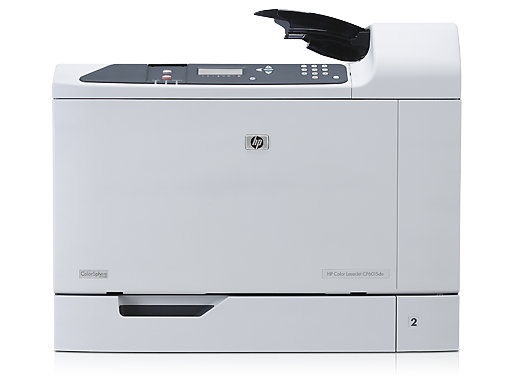



*** ALL TONERS AND SUPPLIES ARE IN STOCK AT DISCOUNTED PRICING , CALL +18882983095.
All reconditioned printers do not include supplies - toners , drums (Imaging Units) (where applicable) , printer cables , manuals , consumables, trays (where applicable). Power cables are included. Drivers can be downloaded from the manufacturers website. Please verify that drivers available are compatible with your software on the manufacturers site.
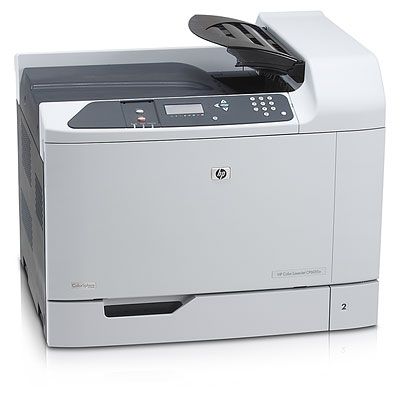
Images are for illustration purposes only and do not necessarily reflect the actual product.Product Details
Specifications
Accessories
Reviews
Product Details
Overview
- Color
- 40/40 PPM
- Duplex Printout
- 600 Sheet
- 1200 x 600 DPI
- 512MB USB
Main Features
- Four-line control panel
- Front-door access to the easy-to-install print cartridges
- 500-sheet face-down output bin
- Duplex switchback tray
- 100-sheet multipurpose tray 1
- Two-sided printing accessory offers fast, efficient duplex printing
- A powerful 835 MHz processor and 512 MB memory
- HP high performance embedded hard disk for job storage
- Access port for Kensington lock
- Two EIO expansion slots for optional network cards, storage, or wireless networking
Hi-Speed USB 2.0 port
HP Jetdirect Gigabit Ethernet print server for easy network sharing
All our reconditioned printers are clean, tested and working.
Specifications
General Specifications
| Interfaces/Ports | |
|---|---|
| USB | Yes |
|
General Information | |
| Manufacturer | Hewlett-Packard |
| Manufacturer Part Number | Q3935A#AK2 |
| UPC Code | 43212105 |
| Brand Name | HP |
| Product Name | CP6015DE Color Laser Printer |
| Marketing Information |
A robust, large format, high performance Color LaserJet printer, for large groups and power users in house printing needs. Expect fast, high quality output, broad media support, full-featured networking, and a range of advanced finishing feature |
| Product Model | CP6015DE |
| Product Type | Laser Printer |
| Manufacturer Website Address | http://www.hp.com |
| Product Line | LaserJet |
| Product Series | CP6015 |
|
Memory | |
| Standard Memory | 512 MB |
|
Network & Communication | |
| Ethernet Technology | Gigabit Ethernet |
| Ethernet | Yes |
|
Physical Characteristics | |
| Height | 22.8" |
| Width | 27.7" |
| Depth | 25.0" |
| Weight (Approximate) | 3041.6 oz |
| Form Factor | Desktop |
|
Media Handling | |
| Media Type | Extra Heavy Paper, Glossy Paper, Heavy Media, High Gloss Film, Light Paper, Plain Paper, Recycled Paper, Tough Media, Envelope, Label, Card Stock, Transparency |
| Media Handling | 1 x Input Tray 500 Sheet, 1 x Multipurpose Feeder 100 Sheet, 1 x Output Bin 500 |
| Standard Input Media Capacity | 600 sheets |
| Number of Input/Multipurpose Trays Installed | 2 |
| Media Size | A3, A4, A5, A6, B4 (JIS), B5, B5 (JIS), B6, C5 Envelope, DL Envelope, Double Postcard, Executive JIS, Banner, 3.90" x 12.60", 5.51" x 17.99", 5.83" x 11.69", 8.27" x 17.01", 5.83" x 12.01", 8.62" x 17.99" |
|
I/O Expansions | |
| Expansion Slots | 2 x EIO |
|
Technical Information | |
| Platform Supported | PC, Mac, SPARC |
| Maximum Mono Print Speed (ppm) | 41 |
| Maximum Color Print Speed (ppm) | 41 |
| Duplex Printing | Automatic |
| Maximum Print Resolution | 1200 x 600 dpi |
| Print Color | Color |
|
Reliability | |
| Duty Cycle | 175000 pages per month |
|
Fonts & Emulation | |
| Language Emulation | PCL 6, PCL 5, PostScript 3, Direct PDF v1.3 |
 Download Manufacturer Specifications
Accessories

Reviews


Printer not working? The printer memory could be full and not getting prints or the prints may be stuck in the print queue. Turn-off the printer, wait a few seconds and turn it back on.
Handle inkjet papers like photographic papers - hold them by the edges to avoid oil deposits and fingerprints.
Fed up of re-sorting your printouts? For those inkjets that don't have a reverse print feature in the driver, some programs offer printing in reverse order.
MY ACCOUNT
INFO & POLICIES
SHOP EASY
PAYMENT OPTIONS



