



 Shopping Cart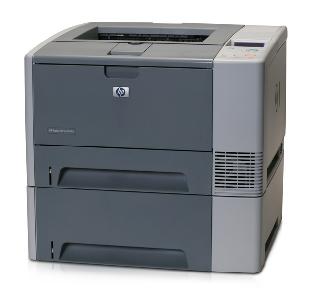

*** ALL TONERS AND SUPPLIES ARE IN STOCK AT DISCOUNTED PRICING , CALL +18882983095.
All reconditioned printers do not include supplies - toners , drums (Imaging Units) (where applicable) , printer cables , manuals , consumables, trays (where applicable). Power cables are included. Drivers can be downloaded from the manufacturers website. Please verify that drivers available are compatible with your software on the manufacturers site.
Images are for illustration purposes only and do not necessarily reflect the actual product.Product Details
Specifications
Accessories
Reviews
Product Details
Overview
Simplify print job management with the intuitive two-line control panel and HP Smart Printing Technology. Industry leading HP Jetdirect options and HP Web Jetadmin² offer easy network configuration and worry-free remote management .
Enhance the impression you create at true 1200 x 1200 dpi resolution and HP Smart Printing Technology, enabling crisp, clear detail at full engine speed. Easily handle complex documents with fast 400 MHz processor and expandable memory up to 320 MB.
Get maximum value and minimum user intervention with automatic two-sided printing, paper input capacity of up to 850-sheet. Add 3rd party solutions such as secure printing, more font choices and barcode printing through two CompactFlash™ slots.
Main Features
- First page out in 10 seconds
- Print Speed: Up to 30 ppm Black
- Resolution: Up to 1200 x 1200 dpi
- Network Ready
- Paper Handling: 350 Sheet Input Capacity Consists of:
- 1 x 100 Sheet Multipurpose Tray
- 1 x 250 Sheet Input Tray
- 1 x 500-sheet Input tray
- Printing Features: Auto Duplexer
- Connectivity: USB, Parallel, and 10/100 Base-TX Ethernet
- Environment: Mac and PC Compatible
- Memory: 64 MB (expandable to 320 MB)
All our reconditioned printers are clean, tested and working.
Specifications
 Download Manufacturer Specifications
Accessories

Reviews


Media settings on your printer determine how much ink will be used. Thinly coated glossy films require less ink, while plain paper soaks in more.
Paper jam? The best way to remove jammed paper is to gently pull the paper in the direction of the paper path - with power off, of course. Do not pull the paper backwards - you could damage your printer forever by doing so.
Pages per minute (ppm) is the average print speed for black and white pages only. Actual speed may be different based on the amount of graphics on each page.
MY ACCOUNT
INFO & POLICIES
SHOP EASY
PAYMENT OPTIONS



