



 Shopping Cart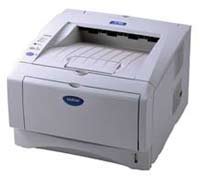

Product Details
Specifications
Accessories
Reviews
Product Details
Overview
The Brother HL5070N is a network-ready monochrome laser printer for your small workgroup. The Brother HL5070-n offers a fast print speed at up to 17ppm, built-in 10/100 BaseT Ethernet print server, 16MB of standard memory (upgradeable to 144MB), PCL6 and BR-Script32 emulations. The HL 5070N is also the first laser printer to support Apple's new Simple Network Configuration technology. With its PC and Mac compatibility and long list of standard features, the HL5070N is your best choice for high-quality workgroup laser printing.
Main Features
- Up to 17ppm print speed
- HQ1200 resolution (up to 2400x600dpi)
- Built-in 10/100 BaseT Ethernet Print Server
- 16MB of standard memory, upgradeable to 144MB*
- PCL?6, BR-Script 31, IBM Proprinter, Epson FX emulations
- 300-sheet paper capacity
- 250-sheet paper tray
- 50-sheet fold-down multi-purpose tray for card stock, letterhead & envelopes - Supports Apple's Simple Network Configuration for Mac? OS X 10.2.4 or greater
- Windows? and Mac? compatible with support for 95/98/NT4.0/Me/2000/XP and Mac? OS 8.6-9.2, OS X 10.1, 10.2.1 or greater
All our reconditioned printers are clean, tested and working.
Specifications
Accessories

Reviews


Most printers will beep once or twice during or after initialization. If it beeps more than that or beeps constantly, it is telling you that something is wrong. Most printers beep when out of paper or out of ink.
Using heavy or stiff paper? Feed the paper one sheet at a time or try placing a sheet of plain copier or bond paper behind a heavy sheet.
All other things being equal, whiter, brighter paper makes text and line graphics crisper and colors more vibrant.
MY ACCOUNT
INFO & POLICIES
SHOP EASY
PAYMENT OPTIONS



