



 Shopping Cart
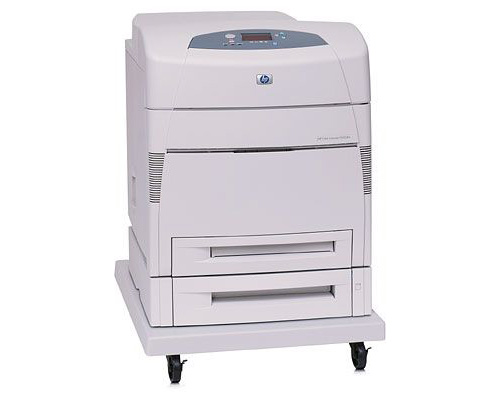
 HP 5500DTN Color Laser Printer RECONDITIONED
*Images may show options not included in price.

Product Details
Specifications
Accessories
Reviews
Product Details
Main Features
- Speed: 21 ppm
- Prints in color
- Processor: 400 MHz
- Automatic duplex copies
- Monthly duty cycle: 120000 pages
All our reconditioned printers are clean, tested and working.
Specifications
General Specifications
| Manufacturer Part # | C9658A |
| Print Technology | HP Color Laser |
| Color Control | ImageREt 2400 provides color print quality to produce photo-realistic images, bold graphics, laser text and refined thin lines. |
| Processor | 400 MHz |
| Print Speed Black/Color | 21 ppm |
| First Page Out Black | 18 seconds |
| Resolution | 600 x 600 dpi with HP ImageREt 2400 |
| Connectivity Ports | IEEE 1284-compliant Bi-Directional Parallel Fast Infrared (FIR) port 2 Open EIO slots |
| Connectivity Network Ports | HP Jetdirect 615n Print Server (10/100Base-T) |
| Languages and Fonts | HP PCL 5c, HP PCL 6, PostScript® 3 emulation |
| Typefaces | 80 TrueType internal scalable in PCL 80 TrueType internal scalable in PS |
| Memory |
160 MB RAM (Expandable to 416 MB) Memory options designed specifically for HP 5500 Series Color LaserJet: SDRAM DIMM: 64 MB RAM (Part #: C7848A), 128 MB RAM (Part #: C7850A), 256 MB RAM (Part #: C9653A) |
| Hard Drives | Optional 10 GB (Part #: J6054B) |
| Input |
1,100 Sheet Input Capacity consists of: One 100 Sheet Capacity Tray, Two 500 Sheet Feeder Tray, Max Input Capacity With All Available Options: 1,600 Sheets |
| Input Options | 500 Sheet Input Tray (Part #: C7130) |
| Printing Features | Automatic Duplex The auto duplex unit automatically turns the paper over for two-sided printing |
| Types/Sizes | Media Types: Paper plain, glossy, film, recycled, envelopes, transparencies, labels, cardstock, Media Sizes: Letter, Legal, Executive, no. 10 envelopes, Monarch envelopes, Multi-Purpose Tray: 3" X 5" to 12.3" X 18.5" 500 Sheet Trays: 5" X 8" to 11" X 17" |
| Monthly Duty Cycle | 120,000 Sheets. The duty cycle is the maximum recommended number of printed pages per month to ensure long printer life. |
| Power Requirements | Source: input voltage 100 to 127 VAC (-10%/+6%) 50/60 Hz (+/-2 Hz); input voltage 220 to 240 VAC (-10%/+6%) 50/60 Hz (+/-2 Hz) power consumption |
| Power Consumption | Printing: 110 volts: 592 watts average; 220 volts: 562 watts average Standby (ready state): 110 volts: 54 watts average; 220 volts: 51 watts average ENERGY STAR® compliantPowersave mode: 110 volts: 48 watts average; 220 volts: 44 watts average |
| Noise Levels | Noise level per ISO 9296, Sound power: LWAd 50 dB(A) Powersave, 65 dB(A) printing, Sound pressure: operating position per ISO 7779: LpAm 49 dB(A) printing, 33 dB(A) standby |
| Temperature | Operating: 50 to 86° F (10 to 30° C), Storage: 32 to 95°F (0 to 35°C) |
| Humidity | Operating: 20 to 80% RH, Storage: 10 to 95% RH |
| Features | wide-format business documents—prints media just over 12 x 18 |
|
Dimensions (H X W X D) |
38.8 " X 24.8" X 27.7" |
| Weight |
250 lb |
| System Requirements PC | Windows 98, Windows NT, Windows 2000, Windows Me, Windows XP |
| System Requirements Mac | OS 8.6+, OS2 |
 Download Manufacturer Specifications
Accessories

Reviews


Be sure that you are printing on the 'right' side of the paper - that is - the coated side.
Is your printer feeding in the whole paper stack rather than just one piece at a time? Fan the paper before putting it in the tray to help separate the sheets. Also, store your paper in a cool, dry place as humidity can contribute to this problem.
Most printers have a paper-out detector. On most dot matrix printers it is a photo diode. If form-fed paper is not aligned correctly (usually on the left side) the diode won't see it.
MY ACCOUNT
INFO & POLICIES
SHOP EASY
PAYMENT OPTIONS



* Images are for illustration purposes only.