



 Shopping Cart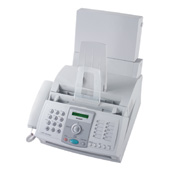

*** ALL TONERS AND SUPPLIES ARE IN STOCK AT DISCOUNTED PRICING , CALL +18882983095..
Printers do not include supplies - toners , drums (Imaging Units) (where applicable) , printer cables , manuals , consumables , trays (where applicable). Power cables are included. Drivers can be downloaded at www.hp.com. Please verify that drivers available are compatible with your software on HP’s site.
Product Details
Specifications
Accessories
Reviews
Product Details
Overview
Now you can do it all with the FO-3150 desktop laser fax. With robust features like a 20-sheet document feeder, letter/legal paper handling, and serial broadcasting to 20 locations, the FO-3150 will increase your productivity while reducing your time in front of the fax machine. Whether sending or receiving, the FO-3150 will get the job done with the predictability and efficiency you expect.
Main Features
-
Automatic Document Feeder - The automatic document feeder can hold up to 20 originals for sending or copying.
-
1.8 MB Standard Memory - The 1.8 MB standard memory can store up to 100 pages of sent documents, or if out of paper or toner, it can receive up to this in memory.
-
Serial Broadcasting - The FO-3150 can send the same document to up to 20 destinations in a single operation.
-
Group Dialing - The FO-3150 can store two dialing groups that can contain up to 20 destinations each. This is convenient for sending documents regularly to the same recipients, such as monthly reports.
-
Zoom Magnification Copy Mode - The FO-3150 offers 7 preset zoom magnification modes for copying a range from 50% to 200%.
-
Help Key for Quick Instructions - The Help Key on the FO-3150 prints a quick instruction sheet on how to perform advanced operations.
Specifications
Accessories
*** ALL TONERS AND SUPPLIES ARE IN STOCK AT DISCOUNTED PRICING , CALL +18882983095
Reviews


When sending dark pages via fax, check the density setting, to ensure the recipient will not receive a document which is too dark to decipher.
If your fax machine doesn’t come on, check the plug, the connection to the machine and that the power switch is on.
Since faxes are not usually "print quality" you may want to consider using cheaper paper than you use in your printers and copiers.
MY ACCOUNT
INFO & POLICIES
SHOP EASY
PAYMENT OPTIONS



