



 Shopping Cart
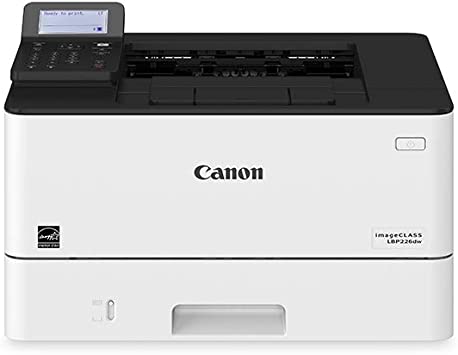
 Canon ImageClass LBP226DW Laser Printer RECONDITIONED

Product Details
Specifications
Accessories
Reviews
Product Details
Main Features
- Monochrome Laser Printer
- Print Speed: 40 pages per minute
- Maximum Resolution: 600 x 600 dpi
- 250 Sheet Input Tray
- 100 Sheet Multipurpose Tray
- Two-sided printing
- USB, WiFi, & Ethernet Connectivity
Specifications
General Specifications
|
MAIN UNIT |
|
| CORE FUNCTIONS | Standard: Print |
| ITEM CODE | 3516C005 |
| PROCESSOR | Canon Custom Processor |
| CONTROL PANEL | 5-line LCD |
| MEMORY | 1 GB |
| STANDARD INTERFACE CONNECTION | USB 2.0 x1 (Host), USB 2.0 x1 (Device) High-Speed, 10/100/1000Base-T Ethernet (Network), Wi-Fi 802.11b/g/n, Wi-Fi® Direct Connection |
|
PAPER CAPACITY (LETTER, 20 LB. BOND) |
Standard: 350 Sheets Maximum: 900 Sheets |
| PAPER SOURCES (LETTER, 20 LB. BOND) | Standard: 250-sheet Paper Cassette, 100-sheet Multipurpose Tray Optional: 550-sheet Paper Cassette (Cassette Unit-AH1) |
| PAPER OUTPUT CAPACITY (LETTER, 20 LB. BOND) | Standard: 65 Sheets |
| SUPPORTED MEDIA TYPES | Cassettes: Thin, Plain, Recycled, Thick, Bond Multipurpose Tray: Thin, Plain, Recycled, Thick, Bond, Label, Envelope (10 Envelopes) |
|
SUPPORTED MEDIA SIZES |
Cassettes: Letter, Legal, Statement, Executive Custom (Min. 4.1" x 5.8" to Max. 8.5" x 14") Multipurpose Tray: Letter, Legal, Statement, Executive Envelope: COM10, Monarch, C5, DL Custom (Min. 3" x 5" to Max. 8.5" x 14") |
| SUPPORTED MEDIA WEIGHTS | Cassettes: 16 lb. Bond to 32 lb. Bond (60 to 120 g/m2) Multipurpose Tray: 16 lb. Bond to 43 lb. Bond (60 to 163 g/m2) |
| WARM-UP TIME | From Power On: 14 Seconds or Less From Sleep Mode: 4 Seconds or Less |
| DIMENSIONS (W x D x H) | Standard (Desktop): 15.8" x 14.7" x 9.9" (401 mm x 373 mm x 250 mm) |
| INSTALLATION SPACE (W x D x H) | Standard (Desktop): 15.8" x 31.7" x 12.3" (401 mm x 804 mm x 312 mm) Fully Configured: 15.8" x 34.4" x 15.0" (401 mm x 874 mm x 381 mm) |
| WEIGHT | Machine Only: Approx. 19.4 lb. (8.8 kg) Boxed Weight: Approx. 28.7 lb. (13.0 kg) |
| OPERATING SYSTEMS | UFR II/PCL/PS: Windows® 7/Windows 8.1/Windows 10/Windows Server 2008/Windows Server 2008 R2/ Windows Server 2012/Windows Server 2012 R2/Windows Server 2016/Mac OS X v10.9.5 (or later) |
|
PRINT SPECIFICATIONS |
|
| PRINTING METHOD | Laser Beam Printing |
| PRINT SPEED4 | Up to 40 ppm (Letter); Up to 32 ppm (Legal) |
| FIRST PRINT OUT TIME | Approx. 5.3 Seconds |
| RECOMMENDED MONTHLY PAGE VOLUME | 750 - 4,000 Pages |
| PRINT RESOLUTION (dpi) | 600 x 600 |
| STANDARD PAGE DESCRIPTION LANGUAGES | UFR II, PCL®6, PCL®5, Adobe PostScript 3® |
| DOUBLE-SIDED PRINTING | Automatic (Standard) |
| DIRECT PRINT | Available from USB Memory (JPEG, TIFF, PDF) |
| PRINTING FROM MOBILE AND CLOUD-BASED SERVICES1 | Apple® AirPrint,® Canon PRINT Business, Mopria™ Print Service, Google Cloud Print™5 |
| FONTS | PCL: 45 Fonts PS: 136 Fonts |
| PRINT FEATURES | Secure Print, Page Border, Header/Footer, Page Layout, Two-sided printing, Collating, Booklet Printing, Grouping, Mixed Paper Sizes/Orientations |
|
SECURITY SPECIFICATIONS |
|
| AUTHENTICATION | Standard: Department ID Authentication |
| DATA | Standard: Verify System at Startup |
| NETWORK | Standard: IP/MAC Address Filtering, IPSEC, TLS Encrypted Communication, SNMP V3.0, IEEE 802.1X, IPv6 |
| DOCUMENT | Standard: Secure Print |
| WI-FI AUTHENTICATION METHODS | Wi-Fi Infrastructure Mode: WEP 64/128 bit, WPA-PSK (TKIP/AES), WPA2-PSK (AES) Wi-Fi Access Point: WPA2-PSK (AES) |
|
ENVIRONMENTAL SPECIFICATIONS |
|
| OPERATING ENVIRONMENT | Temperature: 50 to 86º F Humidity: 20 to 80% RH (no condensation) |
| POWER REQUIREMENTS | AC 120-127 V:6.5 A, 60 Hz |
| POWER CONSUMPTION | Maximum: Approx. 1300 W Standby: Approx. 8.5 W Sleep Mode: Approx. 0.9 W Typical Electricity Consumption (TEC) Rating: 0.33 kWh |
| STANDARDS | ENERGY STAR® Qualified, Currently Rated EPEAT Silver 2 |
Accessories

Reviews


Printer not working? Check if the heads of the toners are clean or not. They must be cleaned periodically.
Misplaced your printer manual? You can usually find a replacement manual online at the manufacturer's website.
Is your printer smearing immediately after changing a cartridge? Check that the protective tape over the nozzles is completely removed.
MY ACCOUNT
INFO & POLICIES
SHOP EASY
PAYMENT OPTIONS



* Images are for illustration purposes only.