



 Shopping Cart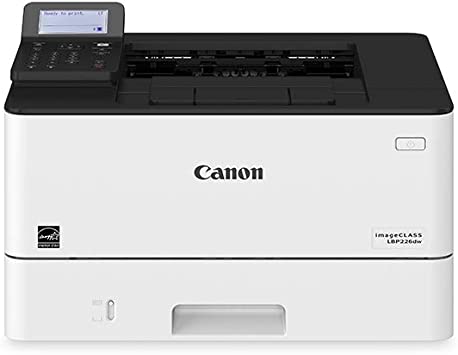

Product Details
Specifications
Accessories
Reviews
Product Details
Main Features
- Monochrome Laser Printer
- Print Speed: 40 pages per minute
- Maximum Resolution: 600 x 600 dpi
- 250 Sheet Input Tray
- 100 Sheet Multipurpose Tray
- Two-sided printing
- USB, WiFi, & Ethernet Connectivity
Specifications
General Specifications
|
MAIN UNIT |
|
| CORE FUNCTIONS | Standard: Print |
| ITEM CODE | 3516C005 |
| PROCESSOR | Canon Custom Processor |
| CONTROL PANEL | 5-line LCD |
| MEMORY | 1 GB |
| STANDARD INTERFACE CONNECTION | USB 2.0 x1 (Host), USB 2.0 x1 (Device) High-Speed, 10/100/1000Base-T Ethernet (Network), Wi-Fi 802.11b/g/n, Wi-Fi® Direct Connection |
|
PAPER CAPACITY (LETTER, 20 LB. BOND) |
Standard: 350 Sheets Maximum: 900 Sheets |
| PAPER SOURCES (LETTER, 20 LB. BOND) | Standard: 250-sheet Paper Cassette, 100-sheet Multipurpose Tray Optional: 550-sheet Paper Cassette (Cassette Unit-AH1) |
| PAPER OUTPUT CAPACITY (LETTER, 20 LB. BOND) | Standard: 65 Sheets |
| SUPPORTED MEDIA TYPES | Cassettes: Thin, Plain, Recycled, Thick, Bond Multipurpose Tray: Thin, Plain, Recycled, Thick, Bond, Label, Envelope (10 Envelopes) |
|
SUPPORTED MEDIA SIZES |
Cassettes: Letter, Legal, Statement, Executive Custom (Min. 4.1" x 5.8" to Max. 8.5" x 14") Multipurpose Tray: Letter, Legal, Statement, Executive Envelope: COM10, Monarch, C5, DL Custom (Min. 3" x 5" to Max. 8.5" x 14") |
| SUPPORTED MEDIA WEIGHTS | Cassettes: 16 lb. Bond to 32 lb. Bond (60 to 120 g/m2) Multipurpose Tray: 16 lb. Bond to 43 lb. Bond (60 to 163 g/m2) |
| WARM-UP TIME | From Power On: 14 Seconds or Less From Sleep Mode: 4 Seconds or Less |
| DIMENSIONS (W x D x H) | Standard (Desktop): 15.8" x 14.7" x 9.9" (401 mm x 373 mm x 250 mm) |
| INSTALLATION SPACE (W x D x H) | Standard (Desktop): 15.8" x 31.7" x 12.3" (401 mm x 804 mm x 312 mm) Fully Configured: 15.8" x 34.4" x 15.0" (401 mm x 874 mm x 381 mm) |
| WEIGHT | Machine Only: Approx. 19.4 lb. (8.8 kg) Boxed Weight: Approx. 28.7 lb. (13.0 kg) |
| OPERATING SYSTEMS | UFR II/PCL/PS: Windows® 7/Windows 8.1/Windows 10/Windows Server 2008/Windows Server 2008 R2/ Windows Server 2012/Windows Server 2012 R2/Windows Server 2016/Mac OS X v10.9.5 (or later) |
|
PRINT SPECIFICATIONS |
|
| PRINTING METHOD | Laser Beam Printing |
| PRINT SPEED4 | Up to 40 ppm (Letter); Up to 32 ppm (Legal) |
| FIRST PRINT OUT TIME | Approx. 5.3 Seconds |
| RECOMMENDED MONTHLY PAGE VOLUME | 750 - 4,000 Pages |
| PRINT RESOLUTION (dpi) | 600 x 600 |
| STANDARD PAGE DESCRIPTION LANGUAGES | UFR II, PCL®6, PCL®5, Adobe PostScript 3® |
| DOUBLE-SIDED PRINTING | Automatic (Standard) |
| DIRECT PRINT | Available from USB Memory (JPEG, TIFF, PDF) |
| PRINTING FROM MOBILE AND CLOUD-BASED SERVICES1 | Apple® AirPrint,® Canon PRINT Business, Mopria™ Print Service, Google Cloud Print™5 |
| FONTS | PCL: 45 Fonts PS: 136 Fonts |
| PRINT FEATURES | Secure Print, Page Border, Header/Footer, Page Layout, Two-sided printing, Collating, Booklet Printing, Grouping, Mixed Paper Sizes/Orientations |
|
SECURITY SPECIFICATIONS |
|
| AUTHENTICATION | Standard: Department ID Authentication |
| DATA | Standard: Verify System at Startup |
| NETWORK | Standard: IP/MAC Address Filtering, IPSEC, TLS Encrypted Communication, SNMP V3.0, IEEE 802.1X, IPv6 |
| DOCUMENT | Standard: Secure Print |
| WI-FI AUTHENTICATION METHODS | Wi-Fi Infrastructure Mode: WEP 64/128 bit, WPA-PSK (TKIP/AES), WPA2-PSK (AES) Wi-Fi Access Point: WPA2-PSK (AES) |
|
ENVIRONMENTAL SPECIFICATIONS |
|
| OPERATING ENVIRONMENT | Temperature: 50 to 86º F Humidity: 20 to 80% RH (no condensation) |
| POWER REQUIREMENTS | AC 120-127 V:6.5 A, 60 Hz |
| POWER CONSUMPTION | Maximum: Approx. 1300 W Standby: Approx. 8.5 W Sleep Mode: Approx. 0.9 W Typical Electricity Consumption (TEC) Rating: 0.33 kWh |
| STANDARDS | ENERGY STAR® Qualified, Currently Rated EPEAT Silver 2 |
Accessories

Reviews


What is RAM? RAM or Buffer Memory holds the graphic information on the printer while the file is on its way to be printed. The larger the RAM, the faster the printer can print complex graphics.
If debris is the primary cause of failures, toner is the primary cause of debris. All toner cartridges release a small amount of toner powder into the machine. This is why it's important to clean the machine when you change the cartridge.
Make sure to select the correct paper type for your print job. In general, for more important documents, use thicker paper.
MY ACCOUNT
INFO & POLICIES
SHOP EASY
PAYMENT OPTIONS



