



 Shopping Cart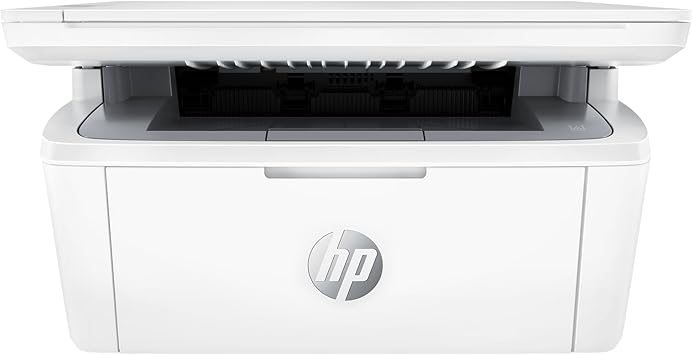

*** ALL TONERS AND SUPPLIES ARE IN STOCK AT DISCOUNTED PRICING , CALL +18882983095.
All reconditioned printers do not include supplies - toners , drums (Imaging Units) (where applicable) , printer cables , manuals , consumables, trays (where applicable). Power cables are included. Drivers can be downloaded from the manufacturers website. Please verify that drivers available are compatible with your software on the manufacturers site.
Product Details
Specifications
Accessories
Reviews
Product Details
Main Features
- Black and white prints
- Print, Copy, Scan
- Print Speed: up to 19 pages per minute
- Maximum Resolution: 600 x 600 dpi
- 150 sheet input tray
- 100 sheet output tray
- USB, WiFi Connectivity
Specifications
General Specifications
| Functions |
Print, copy, scan |
|---|---|
| Print speed black (ISO, letter) |
Up to 19 ppm |
| Duplex printing |
No |
| Duty cycle (monthly, letter) |
Up to 8,000 pagesUp to 8,000 pages |
| Recommended monthly page volume |
100 to 1000 |
| Print quality black (best) |
Up to 600 x 600 dpi |
| Print languages |
PCLm/PCLmS; URF; PWG |
| Print technology |
Laser |
| Connectivity, standard |
1 Hi-Speed USB (compatible with USB 2.0 specifications) |
| Mobile printing capability |
HP Smart App; Apple AirPrint™; Mopria™ Certified; Wi-Fi® Direct Printing 3 3 Wi-Fi® is a registered trademark of Wi-Fi Alliance®. Wireless operations are compatible with 2.4 GHz operations only. Learn more at www.hp.com/go/mobileprinting. Wireless performance is dependent upon physical environment and distance from the access point. AirPrint and the AirPrint Logo are trademarks of Apple® Inc. The Mopria® Logo is a registered and/or unregistered trademark of Mopria Alliance, Inc. in the United States and other countries. Unauthorized use is strictly prohibited. Requires the HP Smart app download. For details on local printing requirements see www.hp.com/go/mobileprinting. Certain features/software are available in English language only, and differ between desktop and mobile applications. Internet access required and must be purchased separately. HP account required for full functionality. List of supported operating systems available in app stores. Fax capabilities are for sending a fax only, and may require additional purchase. For more information, see: www.hpsmart.com/mobile-fax |
| Wireless capability |
Yes |
| Minimum System Requirements for Macintosh |
Apple® macOS Monterey (v12) macOS Ventura (v13) macOS Sonoma (v14); 2 GB HD; Internet required |
| Minimum System Requirements |
Microsoft® Windows® 11, 10: 32-bit or 64-bit, 2 GB available hard disk space, Internet connection, Microsoft® Internet Explorer or Edge. |
| Display |
ICON LCD; LED |
| Processor speed |
500 MHz |
| Maximum Memory |
64 MB Flash ROM; 64MB DDR1; 32 KB NVRAM
|
| Memory |
64 MB |
| Compatible Operating Systems |
Windows 11; Windows 10; Windows Client OS; macOS 12 Monterey; macOS 13 Ventura; macOS 14 Sonoma; macOS 15 Sequoia; Linux (Not supporting Windows® XP (64-bit) and Windows Vista® (64-bit), Windows 7, 8, 8.1. Full solution software available only for Windows 10 and newer; For Windows Server 2008 R2 64-bit, 2012 64-bit, 2012 R2 64-bit, 2016 64-bit only print driver is installed. Windows RT OS for Tablets (32 & 64-bit) uses a simplified HP print driver built into the RT OS; Linux systems use in-OS HPLIP software.) |
| Paper handling input, standard |
150-sheet input tray |
| Paper handling output, standard |
100-sheet output bin |
| Media types |
Plain paper, envelope, postcard, label |
| Media sizes supported |
A4; A5; A6; envelopes (C5, DL); custom |
Accessories

Reviews


Printer not working? The printer memory could be full and not getting prints or the prints may be stuck in the print queue. Turn-off the printer, wait a few seconds and turn it back on.
Are you getting diminished color and print quality? If all your images start to look a bit purple, blue or orange, one of your ink wells may be running low. Replace the whole printer ink cartridge, unless you can refill the individual ink wells.
Using heavy or stiff paper? Feed the paper one sheet at a time or try placing a sheet of plain copier or bond paper behind a heavy sheet.
MY ACCOUNT
INFO & POLICIES
SHOP EASY
PAYMENT OPTIONS



