



 Shopping Cart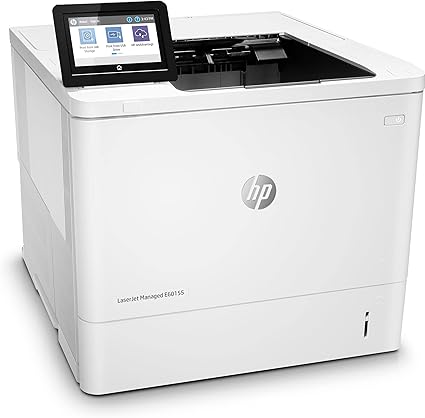

*** ALL TONERS AND SUPPLIES ARE IN STOCK AT DISCOUNTED PRICING , CALL +18882983095.
All reconditioned printers do not include supplies - toners , drums (Imaging Units) (where applicable) , printer cables , manuals , consumables, trays (where applicable). Power cables are included. Drivers can be downloaded from the manufacturers website. Please verify that drivers available are compatible with your software on the manufacturers site.
Images are for illustration purposes only and do not necessarily reflect the actual product.Product Details
Specifications
Accessories
Reviews
Product Details
Mian Features:
- Black and white prints
- Print Speed: up to 55 pages per minute
- Maximum Resolution: 1200 x 1200 dpi
- 4.3 inch color touchscreen
- Two-sided printing
- USB 2.0, Ethernet Connectivity
- Capacity: 650 sheets
Specifications
General Specifications:
| Manufacturer | HP, Inc. |
| UNSPSC | 43212105 |
| Dimensions & Weight / Depth | 46.6 cm |
| Dimensions & Weight / Height | 38 cm |
| Dimensions & Weight / Weight | 21.55 kg |
| Dimensions & Weight / Width | 43.1 cm |
| Office Machine / Functions | Printer |
| Office Machine / Monthly Duty Cycle Range (Printer Class) | 100,000 pages and more |
| Office Machine / Printing Output Type | Monochrome |
| Office Machine / Printing Technology | Laser |
| Office Machine / Type | Printer |
| PC Connectivity / PC Connection |
|
| Power Device / Type | Power supply |
| Printer / Connectivity Technology | Wired |
| Printer / PostScript Support | Standard |
| Printer / Total Media Capacity | 650 sheets |
| Printer / Type | Workgroup printer |
| RAM / Installed Size | 512 MB |
| RAM / Max Supported Size | 1.5 GB |
Accessories

Reviews


Misplaced your printer manual? You can usually find a replacement manual online at the manufacturer's website.
Is your printer smearing immediately after changing a cartridge? Check that the protective tape over the nozzles is completely removed.
Most printers have a paper-out detector. On most dot matrix printers it is a photo diode. If form-fed paper is not aligned correctly (usually on the left side) the diode won't see it.
MY ACCOUNT
INFO & POLICIES
SHOP EASY
PAYMENT OPTIONS



