



 Shopping Cart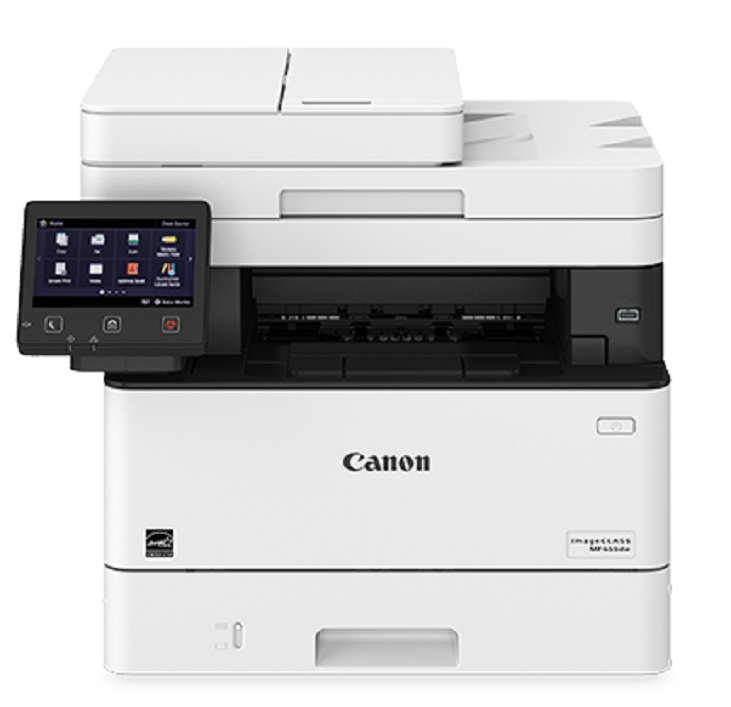

*** ALL TONERS AND SUPPLIES ARE IN STOCK AT DISCOUNTED PRICING , CALL +18882983095.
All reconditioned printers do not include supplies - toners , drums (Imaging Units) (where applicable) , printer cables , manuals , consumables, trays (where applicable). Power cables are included. Drivers can be downloaded . Power cables are included.
Product Details
Specifications
Accessories
Reviews
Product Details
Main Features
- Printer output: 40 pages per minute
- Print, scan, copy and fax functions
- Single-pass document feeder for two-sided scanning
- First print out as fast as 5.4 seconds
- Customizable 5" color touchscreen
- Wireless, black and white laser printer
- Supported media types: Thin, Plain, Recycled, Thick, Bond, Label and Envelope
- Print Resolution: 600 x 600 dpi
- Automatic Duplex prints and scans
- Direct USB Print
- Printing and Scanning from your compatible mobile device
Specifications
General Specifications
|
MAIN UNIT |
|
| CORE FUNCTIONS |
Standard: Print, Copy, Scan, Send, Fax |
| ITEM CODE |
5161C005 |
| PROCESSOR |
Canon Custom Processor |
| CONTROL PANEL |
5" Color Touch Panel |
| MEMORY |
1 GB |
| STANDARD INTERFACE CONNECTION |
USB 2.0 High-Speed, 10/100/1000Base-T Ethernet (Network), Wi-Fi 802.11b/g/n, Wi-Fi® Direct Connection |
|
PAPER CAPACITY (LETTER, 20 LB. BOND) |
Standard: 350 Sheets |
| PAPER SOURCES (LETTER, 20 LB. BOND) |
Standard: 250-sheet Paper Cassette, 100-sheet Multipurpose Tray |
| PAPER OUTPUT CAPACITY (LETTER, 20 LB. BOND) |
Standard: 65 Sheets |
| SUPPORTED MEDIA TYPES |
Cassettes: Thin, Plain, Recycled, Thick, Bond |
|
SUPPORTED MEDIA SIZES |
Cassettes: Letter, Legal, Statement, Executive Custom (Min. 4.1" x 5.8" to Max. 8.5" x 14") |
| SUPPORTED MEDIA WEIGHTS |
Cassettes: 16 lb. Bond to 32 lb. Bond (60 to 120 g/m2) |
| WARM-UP TIME |
From Power On: 14 Seconds or Less |
| DIMENSIONS (W x D x H) |
Standard (Desktop): 17.8" x 18.3" x 15.4" (453 mm x 464 mm x 392 mm) |
| INSTALLATION SPACE (W x D x H) |
Standard (Desktop): 17.9" x 34.8" x 26.2" (453 mm x 883 mm x 664 mm) |
| WEIGHT4 |
Unit: Approx. 35.7 lb. (16.2 kg) |
| OPERATING SYSTEM |
UFR II/PCL/PS: UFR II/PCL/PS: Windows® 8.1/Windows 10/Windows Server 2012/Windows Server 2012 R2/Windows Server 2016/Windows Server 2019/Mac OS X v10.11 (or later) |
|
PRINT SPECIFICATIONS |
|
| PRINTING METHOD |
Laser Beam Printing |
| PRINT SPEED5 |
Up to 40 ppm (Letter); Up to 32 ppm (Legal) |
| FIRST PRINT OUT TIME |
Approx. 5.4 Seconds |
| RECOMMENDED MONTHLY PAGE VOLUME |
750 - 4,000 Pages |
| PRINT RESOLUTION (dpi) |
600 x 600 |
| STANDARD PAGE DESCRIPTION LANGUAGES |
UFR II, PCL®6, PCL®5, Adobe PostScript 3® |
| DOUBLE-SIDED PRINTING |
Automatic (Standard) |
| DIRECT PRINT |
Available from USB Memory (JPEG, TIFF, PDF) |
| PRINTING FROM MOBILE AND CLOUD-BASED SERVICES1 |
Apple® AirPrint,® Canon PRINT Business, Mopria™ Print Service, Print or scan documents directly to or from DropBox, Google Drive, or OneDrive3 |
| FONTS |
PCL: 45 Fonts |
| PRINT FEATURES |
Secured Watermark, Header/Footer, Page Layout, Two-sided Printing, Mixed Paper Sizes, Orientations, Toner Reduction, Poster Printing, Print Date, Collating, Grouping, Page Border,6 Booklet Printing6 |
|
COPY SPECIFICATIONS |
|
| COPY SPEED |
Up to 40 ppm (Letter); Up to 32 ppm (Legal) |
| FIRST-COPY-OUT-TIME (LETTER) |
Approx. 6.2 seconds |
| COPY RESOLUTION |
600 x 600 |
| COPY SIZE |
Platen: Up to Letter |
| MULTIPLE COPIES |
Up to 999 Copies |
| COPY EXPOSURE |
Automatic |
| MAGNIFICATION |
25% - 400% (1% Increments) |
| PRESET REDUCTIONS |
25%, 50%, 64%, 78% |
| PRESET ENLARGEMENTS |
129%, 200%, 400% |
| COPY FEATURES |
Preset R/E Ratios by Area, Two-Sided, Density Adjustment, Original Type Selection, Two-sided Original, Sort, N on 1, Different Size Originals, Sharpness, Erase Frame, Copy ID Card, Copy Passport, Paper Settings, Favorite Settings, Cancel, Collate |
|
SCAN SPECIFICATIONS |
|
| TYPE |
Single-Pass Duplexing Automatic Document Feeder |
| DOCUMENT FEEDER PAPER CAPACITY |
50 Sheets (20 lb. Bond) |
| DOCUMENT FEEDER SUPPORTED MEDIA SIZES |
Legal, Letter, Statement |
| DOCUMENT FEEDER SUPPORTED MEDIA WEIGHTS |
Single and Double-sided scanning: 13-28 lb. Bond (50-105 g/m2) |
| PLATEN ACCEPTABLE ORIGINALS |
Sheet, Book |
| PULL SCAN |
ScanGear MF for TWAIN, WIA, and ICA |
| SCAN RESOLUTION |
600 x 600 |
| SCAN TO MOBILE DEVICES |
Canon PRINT Business |
| SCAN SPEED (LETTER) |
Single-sided: 13/38 ipm (300 x 300 dpi) (Color/BW) |
| MEMORY MEDIA |
Standard USB Memory (JPEG, TIFF, PDF) |
|
SEND SPECIFICATIONS |
|
| DESTINATION |
Email/Internet FAX (SMTP), SMB, FTP, Super G3 FAX |
| ADDRESS BOOK |
LDAP (50)/Local (300)/Speed Dial (281) |
| SEND RESOLUTION |
300 x 300 |
| COMMUICATION PROTOCOL |
File: FTP, SMB Email/iFax: SMTP, POP3, iFax (Simple) |
| FILE FORMAT |
Standard: TIFF, JPEG, PDF (Compact, Searchable) |
|
FAX SPECIFICATIONS |
|
| MODEM SPEED |
Super G3: 33.6 kbps |
| COMPRESSION METHOD |
MH, MR, MMR, JBIG |
| RESOLUTION |
400 x 400, 200 x 400, 200 x 200, 200 x 100 |
| SENDING / RECORDING SIZE |
Statement to Legal |
| FAX MEMORY |
Up to 512 Pages |
| SPEED DIALS |
Max. 281 |
| GROUP DIALS / DESTINATIONS |
Max. 299 Dials |
| SEQUENTIAL BROADCAST |
Max. 310 Addresses |
| MEMORY BACKUP |
Yes |
| FAX FEATURES |
Sender's Name, Direct Send, TX Report, Sequential Broadcasting, Sending 2-Sided document, Resolution, RX mode, Density, Sharpness, Favorite Settings |
|
SECURITY SPECIFICATIONS |
|
| AUTHENTICATION |
Standard: Department ID Authentication |
| DATA |
Standard: Verify System at Startup |
| NETWORK |
Standard: IP/MAC Address Filtering, IPSEC, TLS Encrypted Communication, SNMP V3.0, IEEE 802.11b/g/n, IPv6, SMTP Authentication, POP Authentication before SMTP |
| DOCUMENT |
Standard: Secure Print, Searchable PDF |
| WI-FI AUTHENTICATION METHODS |
Wi-Fi Infrastructure Mode: |
|
ENVIRONMENTAL SPECIFICATIONS |
|
| OPERATING ENVIRONMENT |
Temperature: 50 to 86º F |
| POWER REQUIREMENTS |
AC 120-127 V:5.9 A, 60 Hz |
| POWER CONSUMPTION |
Maximum: Approx. 1330 W |
| STANDARDS |
ENERGY STAR® Qualified, Currently Rated EPEAT Silver2 |
 Download Manufacturer Specifications
Accessories

Reviews


Printing photos? Make sure that they are of print quality - meaning 300dpi. Anything lower than this will appear pixelated and lower than photo quality.
Your printer is not a dumping ground. Don't pile documents or other things on top of it, as they could cause damage. Your printer could overheat and this could result in malfunctioning and even a reduction in the printer's life.
Paper jam? The best way to remove jammed paper is to gently pull the paper in the direction of the paper path - with power off, of course. Do not pull the paper backwards - you could damage your printer forever by doing so.
MY ACCOUNT
INFO & POLICIES
SHOP EASY
PAYMENT OPTIONS



