



 Shopping Cart
 Okidata MC780f+ Color Multifunction Printer
*Images may show options not included in price.

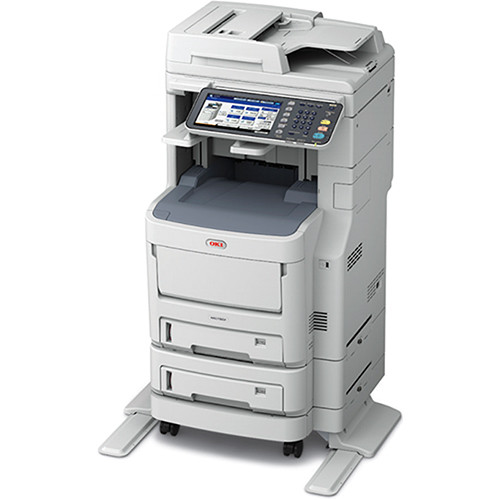
Images are for illustration purposes only and do not necessarily reflect the actual product.
PRINT
Product Details
Specifications
Accessories
Reviews
Product Details
Main Features
- Print, copy, scan and fax
- Monthly duty cycle: 150,000 pages
- Print speed : 42 ppm (color/mono )
- First page out: 8/9 seconds (mono/color)
- Up to 1200 x 600 dpi resolution
- Standard paper capacity: 1160 sheets
- Maximum paper capacity: 1690 sheets
- 100-sheet duplex reversing RADF
- 50 sheet inline stapler
- Built in finisher
- Automatic collating
- Duplex copying/printing
- Direct USB printing
- Customizable 9” color LCD touch screen
- 1 Gigabit Ethernet and High-speed USB connectivity
- Energy Star compliant
Specifications
General Specifications
COPY
| Type | Floor / Desktop |
|---|---|
| Scanning Method | Color CIS |
| Printing Technology | Digital 4 LED Full-color Electrophotographic Printing Method |
| Copy Density Adjustment | 11 levels (Manual) |
| Input Capacity | Tray 1 : 580 sheets (Optional)Additional Tray : 580 sheets (Optional)Large Capacity Feeder : 2400 sheets Multi-purpose tray : 110 sheets |
| Scan Resolution | Up to 600 x 600 dpi |
| Print Resolution | Up to 600 x 600 dpi |
| Original Type | Sheet, Book |
| Original Size | Flatbed: A4, A5, Letter, Legal 14; ADF: A4, A5, Letter, Legal 14 |
| Copy Paper Size | A4, A5, A6, B5, Letter, Legal 13, Legal 13.5, Legal 14, Executive |
| Reduction / Enlargement | 25 – 400 % |
| Maximum Copies | 999 sheets |
| Copy Speed | Letter 40 cpm color, 40 cpm mono |
| First Copy Out Time | Color: Approx. 13.0 seconds, Mono: Approx. 13.0 seconds |
| Warm-up Time | Approx. 60.0 seconds from power-on Approx. 35.0 seconds from power save |
| Power Source | Single phase 110 - 127 VAC ±10%, 50/60 Hz ±2% |
| Power Consumption | Operating: Max. 1,500W / Ave. 800W Idle: 130W Power Save: 60.0W Deep Sleep: 2.0W Auto-Off: 0.5W |
| Memory (Std./Max.) | 2GB/2GB |
| Safety & Environment Regulation | cULus Mark |
| Noise Level | Operating :Approx. 57 dBA Idle: < 37 dBA Power save: Background level |
| Operating Environment | Operating: 50 - 90 °F (10 - 32 °C), 20 - 80 %RH Storage: 32 - 109 °F (0 - 43 °C), 10 - 90 %RH No condensation |
| Dimensions(WxDxH) | 21.7“ x 23.8“ x 26.6“ (552 x 604 x 675 mm) |
| Duty Cycle | Recommended: 4,000 pages/month Maximum: 60,000 pages/month |
SCAN
| Scan Resolution | Max. 600 x 600 dpi |
|---|---|
| Scan Speed | Max. 40 ipm Color, 40 ipm mono |
| Interfaces | 1000BASE-T/100BASE-TX/10BASE-T, USB 2.0 (High Speed) Host, USB 2.0 (High Speed) |
| Supported Protocol | SMB, FTP(S), TWAIN, WIA2.0, ICA |
| Output Format | Secure PDF, High compression PDF, JPEG, TIFF, XPS |
| Driver | TWAIN, WIA2.0(Windows Vista or later) |
FAX
| Applicable Line | PSTN, PBX |
|---|---|
| Interface | RJ-11 x 2 (Line, Tel) |
| Transmission Resolution | Normal: 200 x 100 dpi Fine/Photo: 200 x 200 dpi Ultra-Fine: 400 x 400 dpi |
| Communication Speed | Super G3: 33.6kbps |
| Encoding Method | MH, MR, MMR, JBIG |
| Communication Mode | ITU-T G3, Super G3 |
| Transmission Original Size | Max. Legal 14, Length 14.0“ (356 mm) |
| Paper Size | Max.Legal 14, Min.A5 |
| Transmission Time | Approx. 3.0 sec. / page |
| Memory | Max. 1,000 pages (1000MB) |
| Other Function | Broadcast(200 group, 400 locations/group), Delayed Tx, PC Fax, Speed Dial(3000 locations) |
DOCUMENT FEEDER
| Type | Reverse Automatic Document Feeder (RADF) |
|---|---|
| Original Size | A4, A5, A6, B5, Letter, Legal 13, Legal 13.5, Legal 14, Executive |
| Original Weight | 16.0 - 27.9 lb. bond (60 - 105 gsm) |
| Capacity | Max. 100 sheets |
| Original Exchange Speed | Simplex 40 ppm color, 40 ppm mono |
 Download Manufacturer Specifications
Accessories

Reviews


Make sure to select the correct paper type for your print job. In general, for more important documents, use thicker paper.
Printer not working? Check that the ink and toner are there and properly filled.
Handle inkjet papers like photographic papers - hold them by the edges to avoid oil deposits and fingerprints.
MY ACCOUNT
INFO & POLICIES
SHOP EASY
PAYMENT OPTIONS



* Images are for illustration purposes only.