



 Shopping Cart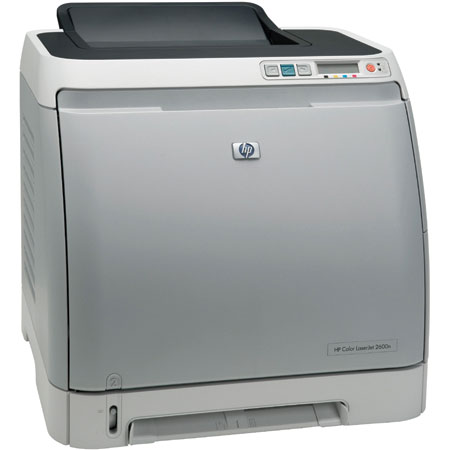

*** ALL TONERS AND SUPPLIES ARE IN STOCK AT DISCOUNTED PRICING , CALL +18882983095.
All reconditioned printers do not include supplies - toners , drums (Imaging Units) (where applicable) , printer cables , manuals , consumables, trays (where applicable). Power cables are included. Drivers can be downloaded from the manufacturers website. Please verify that drivers available are compatible with your software on the manufacturers site.
Product Details
Specifications
Accessories
Reviews
Product Details
Main Features
- Print Speed: 8 ppm Black, 8 ppm Color
- First page out in 20 seconds
- Resolution: 600 x 600 dpi, with HP Image REt 2400
- Paper Handling: 250 Sheet Input Capacity
- Environments: PC and Mac Compatible
- Memory: 16 MB
- Connectivity: USB and 10/100 Base-TX Ethernet
FULLY REFURBISHED WITH A 1 YEAR WARRANTY.
Specifications
General Specifications
|
Manufacturer Part # |
Q6455A#ABA |
| Print Technology | Laser |
| Processor | 264 MHz |
| First Page Out Black/Color | 20 seconds |
| Resolution | 600 by 600 dpi with HP ImageREt 2400 |
| Connectivity Ports | Hi-Speed USB 2.0 and built-in Fast Ethernet networking |
| Languages and Fonts | Host-based (Uses the processing power and resources of your computer to process the print job. No PCL or PostScript.) |
| Memory | 16 MB (Not Expandable) |
| Paper Handling | Input: 250 Sheets (Expandable to 500 Sheets) Output: 125 Sheets Media Types Paper (plain, letterhead, prepunched, bond, color, rough, preprinted, recycled), HP Glossy Media, HP Cover Paper, HP Color LaserJet Transparencies, labels, envelopes, and cardstock Media Sizes: 3 x 5 to 8.5 x 14 in Media Weights: 16 to 47 lb (60 to 177 g/m2) |
| Monthly Duty Cycle | 35,000 pages per month The duty cycle is the maximum recommended number of printed pages per month to ensure long printer life. |
| Power Consumption | N/A |
| Noise Levels | N/A |
| Temperature | N/A |
| Humidity | N/A |
| System Requirements | Windows� N/A Other N/A |
| Dimensions (H X W X D) | Unit 14.6" x 16.02" x 17.83" |
| Weight | Unit 40.5 lbs |
Accessories

Reviews


Use a lightly dampened cloth to clean the outside of your laser printer. To clean the inside, use a dry, lint-free cloth to make sure that no liquid enters the inner parts of the printer.
Don't be in a rush with your printer as you can easily damage a printer, or even get hurt, if you do not follow the instructions in the user manual.
Printer not working? Check if the heads of the toners are clean or not. They must be cleaned periodically.
MY ACCOUNT
INFO & POLICIES
SHOP EASY
PAYMENT OPTIONS



