



 Shopping Cart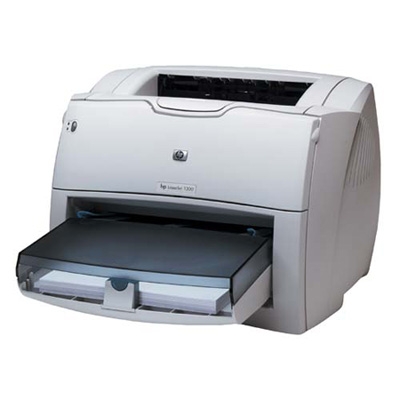

*** ALL TONERS AND SUPPLIES ARE IN STOCK AT DISCOUNTED PRICING , CALL +18882983095.
All reconditioned printers do not include supplies - toners , drums (Imaging Units) (where applicable) , printer cables , manuals , consumables, trays (where applicable). Power cables are included. Drivers can be downloaded from the manufacturers website. Please verify that drivers available are compatible with your software on the manufacturers site.
Images are for illustration purposes only and do not necessarily reflect the actual product.Product Details
Specifications
Accessories
Reviews
Product Details
Main Features
-
Prints up to 20 ppm
-
133-MHz processor and 16 MB RAM (expandable to 80 MB) to accomodate the demands of personal or shared printing needs.
- Instant-on fuser provides first page out in just 8 seconds
- Uses the DIMM slot to add more memory, fonts or third-party solutions.
- Prints with HP PCL 5e, HP PCL 6 or HP Postscript Level 2 emulation.
- Printing systems support a wide range of operating systems: Microsoft Windows 98 and later, Mac OS 9.x and OS X, Linux, UNIX and MS-DOS.
-
This printer is similar to the HP LaserJet 1200
FULLY REFURBISHED WITH A 1 YEAR WARRANTY.
Specifications
General Specifications
|
Network Ready
|
Optional
|
|
Network Capabilities
|
Via optional HP Jetdirect print server (external, internal or wireless)
|
|
Print Quality (Black, Best Quality, A4)
|
1200 x 1200 dpi
|
|
Print Speed (Black, Best Quality, A4)
|
19 ppm
|
|
Print technology
|
Monochrome Laser
|
|
Processor Speed
|
133 MHz
|
| Model |
Q1334A – (HP LaserJet 1300)
|
Accessories

Reviews


Out of a color cartridge? Many printer drivers include an option to print using black only, or equivalent options to override the refusal to print.
Don't move a print head unless the instructions direct it. You can damage the belt or other parts.
Printer not working? Check if the heads of the toners are clean or not. They must be cleaned periodically.
MY ACCOUNT
INFO & POLICIES
SHOP EASY
PAYMENT OPTIONS



