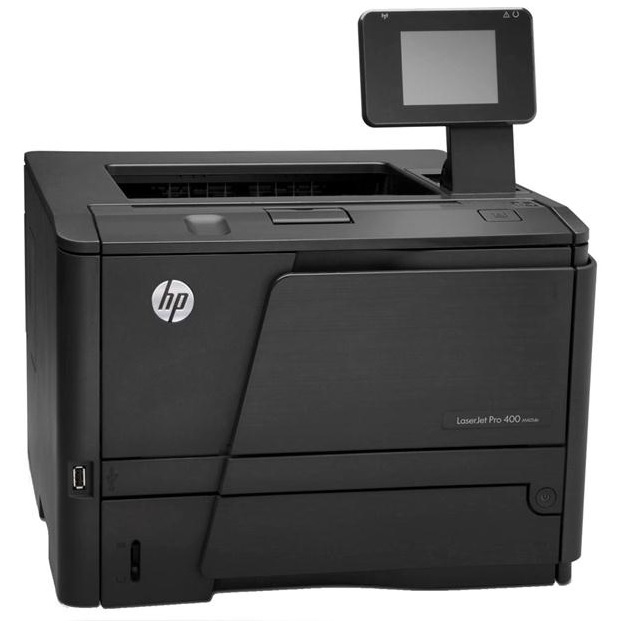
| Functions |
Print |
| Print speed, black (normal) |
Up to 35 ppm |
| Print Speed |
- Measured using ISO/IEC 24734, excludes first set of test documents. For more information see http://www.hp.com/go/printerclaims. Exact speed varies depending on the system configuration, software application, driver, and document complexity.
|
| Printer Page Yield |
- Declared yield value in accordance with ISO/IEC 19752. Actual yields vary considerably based on images printed and other factors. For more information, visit http://www.hp.com/go/learnaboutsupplies
|
| Resolution (black) |
1200 x 1200 dpi |
| Resolution Technology |
- HP FastRes 1200, HP ProRes 1200, 600 dpi
|
| Monthly Duty Cycle |
- Duty cycle is defined as the maximum number of pages per month of imaged output. This value provides a comparison of product robustness in relation to other HP LaserJet or HP Color LaserJet devices, and enables appropriate deployment of printers and MFPs to satisfy the demands of connected individuals or groups.
|
| Recommended Monthly Page Volume |
- HP recommends that the number of printed pages per month be within the stated range for optimum device performance, based on factors including supplies replacement intervals and device life over an extended warranty period.
|
| Print Technology |
Laser |
| Display |
- 2-line LCD (text and graphics)
|
| Processor Speed |
|
| Replacement Cartridges |
- HP 80A Black LaserJet Toner Cartridge (~2700 pages), CF280A; HP 80X Black LaserJet Toner Cartridge (~6900 pages), CF280X
|
| Print Languages |
- HP PCL 5e, HP PCL 6, HP Postscript Level 3 emulation, direct PDF (v 1.7) printing
|
| Automatic Paper Sensor |
No |
| Paper Trays, standard |
2 |
| Paper Trays, maximum |
3 |
| HP ePrint Capability |
Yes |
| Connectivity, Standard |
- 1 Hi-Speed USB 2.0; 1 Ethernet 10/100/1000T network
|
| Network Ready |
- Standard (built-in Gigabit Ethernet)
|
| Ports |
- 1 Hi-Speed USB 2.0; 1 Ethernet 10/100/1000T network
|
| Security |
- Password-protected network embedded Web server; enable/disable Network protocols; SNMPv2 community password change; SNMPv3; 802.1x; SSL cert management; Firewall; Access Control List
|
| Minimum System Requirements |
- Microsoft® Windows® 7 (32-bit/64-bit), Windows Vista® (32-bit/64-bit): 1 GHz 32-bit (x86) or 64-bit (x64) processor, 1 GB RAM (32-bit) or 2 GB RAM (64-bit), 400 MB hard disk space, CD-ROM/DVD-ROM or Internet, USB or Network port; Windows® XP32 SP2 (32-bit): Pentium® 233 MHz processor, 512 MB RAM, 400 MB hard disk space, CD-ROM/DVD-ROM or Internet, USB or Network port
- Mac OS X v 10.5, v 10.6, v 10.7; PowerPC G4, G5, or Intel® Core™ Processor; 500 MB hard disk; CD-ROM/DVD-ROM or Internet; USB or Network
|
| Compatible Operating Systems |
- Full software installs supported on: Microsoft® Windows®7 32-bit and 64-bit, Windows Vista® 32-bit and 64-bit, Windows® XP 32-bit (SP2 or higher); Driver only installs supported on: Microsoft® Windows® Server 2008 32-bit and 64-bit, Windows® Server 2003 32-bit (SP3 or higher); Mac OS X v 10.5, v 10.6, v 10.7; Linpus Linux : 9.4, 9.5; Red Hat Enterprise Linux: 5.0, 6.0; OpenSuSE: 11.3, 11.4; Fedora: 14, 15; Ubuntu: 10.04, 10.10, 11.04; Debian: 5.0, 6.0 and HPUX11i
|
| Memory |
|
| Printer Management |
- Windows: HP Device Toolbox (default install), SNP Alerts (minimum network install), HP Web Jetadmin (download); Mac: HP Utility
|
| Supported Network Protocols |
- Via built-in networking solution: TCP/IP, IPv4, IPv6; print: TCP-IP port 9100 Direct Mode, LPD (raw queue support only), Web Services Printing, IPP 2.0, Apple AirPrint™, HP ePrint, FTP Print; DISCOVERY: SLP, Bonjour, Web Services Discovery; IP CONFIG: IPv4 (BootP, DHCP, AutoIP, Manual, TFTP Config, ARP-Ping), IPv6 (Stateless Link-Local and via Router, Statefull via DHCPv6); Management: SNMPv2/v3, HTTP/HTTPs, Telnet, TFTP Config, FTP FW Download, Syslog; Security: SNMPv3, SSL Cert Management, Firewall, ACL, 802.1x
|
| Paper Handling Input, Standard |
- 50-sheet multipurpose tray 1, 250-sheet input tray 2
|
| Paper Handling Output, Standard |
|
| Duplex Printing |
- Manual (driver support provided)
|
| Finished Output Handling |
Sheetfed |
| Media Sizes Supported |
- Letter, legal, executive, 8.5 x 13 in
|
| Media Sizes Supported |
A4; A5; A6; B5 (JIS) |
| Media Sizes Custom |
- Multipurpose tray: 3 x 5 to 8.5 x 14 in; tray 2 and optional 500-sheet-tray 3: 4.1 x 5.8 to 8.5 x 14 in
|
| Media Types |
- Paper (plain, Green mode, light, heavy, bond, color, letterhead, preprinted, prepunched, recycled, rough); envelopes; labels; transparencies, cardstock
|
| Supported Media Weight |
- Tray 1: 16 to 43 lb (straight through paper path for special media); tray 2, optional 500-sheet tray 3: 16 to 32 lb
|
| Media Weights by Paper Path |
- Tray 1: 60 to 163 g/m² (straight through paper path for special media); tray 2, optional 500-sheet tray 3: 60 to 120 g/m²
|
|
Power
|
|
| Input Voltage |
- 110 to 127 VAC (+/- 10%), 50/60 Hz (+/- 2 Hz)
|
| Power Consumption |
- 570 watts (Printing), 7.3 watts (Ready), 6.2 watts (Sleep), 0.1 watts (Off)
- Power requirements are based on the country/region where the printer is sold. Do not convert operating voltages. This will damage the printer.
|
| Operating Temperature Range |
|
| Operating Humidity Range |
|




 Shopping Cart