



 Shopping Cart
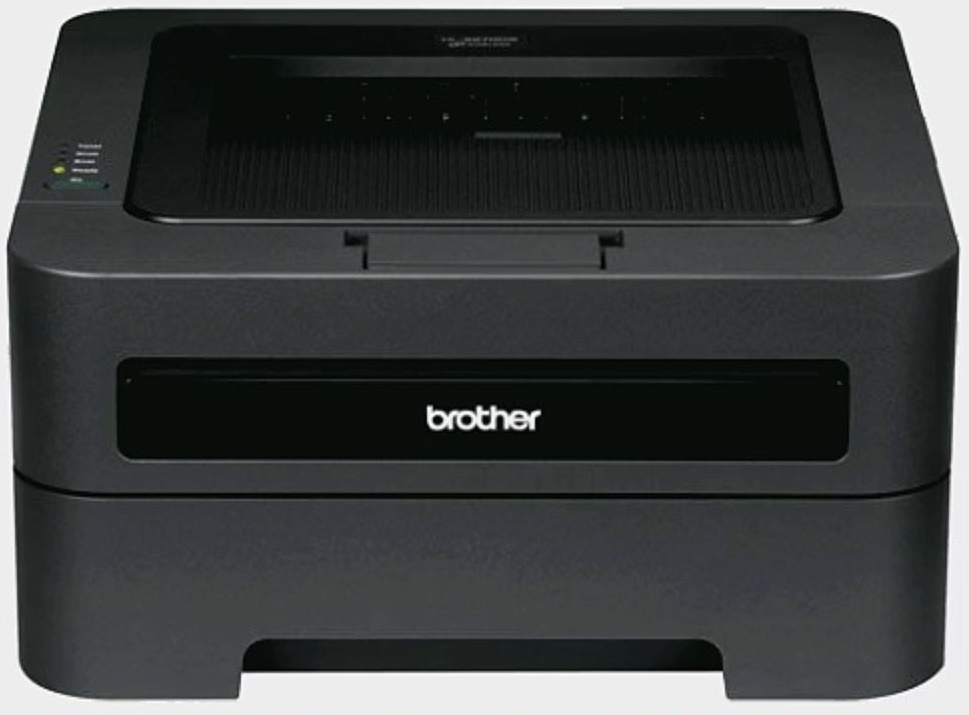
 Brother HL-2275DW Laser Printer RECONDITIONED

Product Details
Specifications
Accessories
Reviews
Product Details
Main Features
- 27 pages per minute print speed
- Black and white prints
- Compact design
- Network enabled
- Automatic duplex printing
- 250 sheet paper tray
- USB 2.0 interface
- Holds letter and legal sized paper
Specifications
General Specifications
| Print Technology | B/W Laser Technology |
| Max. Black Print Speed (ppm) | 27ppm Black |
| Duplex Printing Standard | Yes |
| Print Resolution (maximum dpi) | Up to 2400 x 600 dpi |
| LCD Display | No |
| First Time to Print | Less than 8.5 sec. |
| Printer Driver Compatibility† | Windows®, Mac OS® & Linux |
| CPU (Processor) Speed | 200 MHz |
| Emulation(s) | GDI, PCL6 |
| Standard Memory (MB) | 32MB Memory |
| Optional Memory (MB) | No |
| Toner Save Mode | Yes |
| Max. Monthly Duty Cycle‡ | 10,000 pages |
| Recommended Monthly Print Volume‡ | 250 to 2,000 pages |
Paper Handling
| Standard Paper Capacity (sheets)‡ | 250-Sheet Input Capacity |
| Optional Paper Capacity (sheets) | No |
| Multi-purpose Tray Capacity‡ | Single-sheet manual bypass |
| Output Paper Capacity (sheets) | 100 sheets |
| Output Paper Capacity with all Options | 100 sheets |
| Paper Handling Size - Paper Tray | Letter, Legal, Executive, A4, A5, A6, B5, B6 |
| Paper Handling Size - Manual Feed | Letter, Legal, Executive, A4, A5, A6, B5, B6, Envelopes, Custom Sizes (3.0-8.5" (w), 4.57-14" (l)) |
| Sheet Weight - Paper Tray | 16-28 lbs. (bond) |
| Sheet Weight - Manual Feed | 16-43 lbs. (bond) |
| Media Type | Plain, Bond, Envelopes, Labels |
Connectivity & Compatibility
| Standard Interface(s) | Wireless 802.11b/g, 10/100 Base-TX Ethernet, Hi-Speed USB 2.0 |
| Mobile Device Compatibility‡ | Brother™ iPrint&Scan, Cortado Workplace |
| Supported Network Protocols (IPv4) | ARP, RARP, BOOTP, DHCP, APIPA (Auto IP), WINS / NetBIOS name resolution, DNS Resolver, mDNS, LLMNR responder, LPR / LPD, Custom Raw Port / Port 9100, IPP, FTP Server, SNMPv1 / v2c, HTTP Server, TFTP Client and Server, SMTP Client, ICMP, Web Services (Print), LLTD responder, POP, POP before SMTP, SMTP-AUTH |
| Supported Network Protocols (IPv6) | NDP, RA, DNS Resolver, mDNS, LLMNR responder, LPR / LPD, Custom Raw Port / Port 9100, IPP, FTP server, SNMPv1 / v2c, HTTP Server, TFTP Client and Server, SMTP Client, ICMPv6, LLTD responder, Web Services (Print) |
| One-Push Wireless Configuration | AOSS™, Wi-Fi Protected Setup™ |
Security Features
| Wireless Network Security | WEP 64/128, WPA-PSK (TKIP/AES), WPA2-PSK (AES) |
Power & Operating Requirements
| ENERGY STAR® Qualified | Yes |
| Power Consumption - Sleep/Ready/Printing | .9W (Sleep WLAN On: 2.8W)/65W/495W |
| Machine Noise (Ready/Printing) | 31dB/53dB |
| Power Source | AC 120V 50/60 Hz |
| Operating Env: Temperature | 50-90.5 degrees F |
| Operating Env: Humidity | 20-80% (w/out condensation) |
Dimensions & Weights
| Unit Dimensions (W"xD"xH") | 14.5" x 14.2" x 7.2" |
| Carton Dimensions (W"xD"xH") | 18.7" x 17.9" x 13.0" |
| Unit Weight (lbs) | 15.4 lbs. |
| Carton Weight (lbs) | 18.3 lbs. |
 Download Manufacturer Specifications
Accessories

Reviews


Paper coatings are designed to control ink absorption and spread, producing brilliant, sharp images with less ink.
Media settings on your printer determine how much ink will be used. Thinly coated glossy films require less ink, while plain paper soaks in more.
Paper jam? The best way to remove jammed paper is to gently pull the paper in the direction of the paper path - with power off, of course. Do not pull the paper backwards - you could damage your printer forever by doing so.
MY ACCOUNT
INFO & POLICIES
SHOP EASY
PAYMENT OPTIONS



* Images are for illustration purposes only.