



 Shopping Cart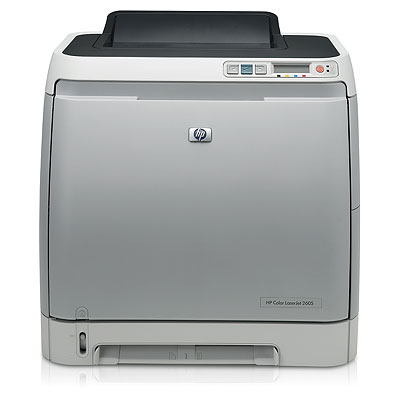



*** ALL TONERS AND SUPPLIES ARE IN STOCK AT DISCOUNTED PRICING , CALL +18882983095.
All reconditioned printers do not include supplies - toners , drums (Imaging Units) (where applicable) , printer cables , manuals , consumables, trays (where applicable). Power cables are included. Drivers can be downloaded from the manufacturers website. Please verify that drivers available are compatible with your software on the manufacturers site.
Product Details
Specifications
Accessories
Reviews
Product Details
Overview
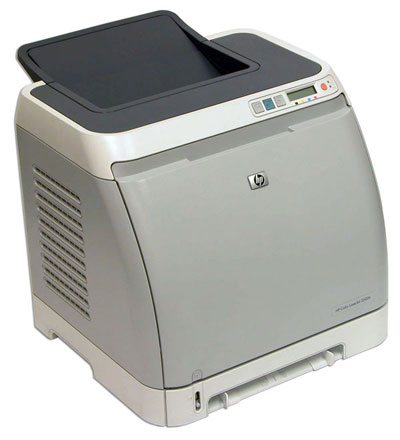
- Professional, network-ready color LaserJet printer
- Hi-speed USB port; built-in Ethernet print server
- Fast print speeds of up to 12 pages per minute
- 64 MB of built-in memory (expandable to 320 MB)
- Compatible with wide range of media types
Main Features
- Easy-to-use control panel with two-line, 16-character display provides instant supplies information
- 125-sheet output bin
- Automatic two-sided printing increases efficiency
- One-door access to the four easy-to-install print cartridges
- 250-sheet input tray 3 (standard on dtn model; optional with dn model)
- Priority feed slot for specialty paper and 250-sheet multipurpose tray 2
- 64 MB of standard printing memory and a powerful 300 MHz processor perform complex tasks quickly
- Built-in Hi-Speed USB 2.0 port
- Built-in 10/100 Base-TX Ethernet/Fast Ethernet print server enables cost-effective networking
All our reconditioned printers are clean, tested and working.
Specifications
General Specifications
| General | |
| Brand | HP |
| Series | Color LaserJet |
| Model | 2605DN |
| Part# | Q7822A |
| Recommended Use | Workgroup |
| Dimensions | 16.1" x 17.8" x 16.3" |
| Weight | 43.8 lbs. |
|
Printing |
|
| Output Type | Color |
| Laser Technology | Laser |
| Black Print Speed | Up to 12 ppm |
| Color Print Speed | Up to 10 ppm |
| Black Print Quality | 600 x 600 dpi |
| Color Print Quality | 600 x 600 dpi |
| Print Languages, std. | HP PCL 6, HP PCL 5e, HP PostScript Level 3 emulation |
| Duplex Printing | Yes |
|
Media Handling |
|
| Paper Trays, std. | 1 |
| Paper Trays, max. | 2 |
| Input Capacity, std. | Upto 250 sheets |
| Output Capacity, std. | Upto 125 sheets |
| Media Type | Paper (bond, brochure, color, glossy, letterhead, photo, plain, preprinted, prepunched, recycled, rough), transparencies, labels, envelopes, cardstock |
| Media Sizes Supported | Letter, legal, executive, envelopes (No 10, Monarch) |
|
Ports |
|
| USB Ports | Yes |
| Network Ports | Ethernet 10/100BaseTX (RJ-45) |
|
Hardware SPEC |
|
| Processor(MHz) | 300 |
| Memory, std. | 64 MB |
| Memory, max. | 320 MB |
| Power Requirements | 110-volt models: 110 to 127 VAC (+/- 10 percent), 60 Hz (+/- 3 Hz) 220-volt models: 220 to 240 VAC (+/- 10 percent), 50 Hz (+/- 3 Hz) |
| Power Consumption | Printing 255 watts Standby 18 watts Off <1 watt |
|
Compatibility |
|
| Windows Compatible | Windows 2000; Windows XP Home; Windows XP Professional; Windows Server 2003; Windows Vista(TM) Ready |
| Macintosh Compatible | Mac OS X v 10.2.8; Mac OS X v 10.3; Mac OS X v 10.4 or higher |
 Download Manufacturer Specifications
Accessories

Reviews


Is your printer feeding in the whole paper stack rather than just one piece at a time? Fan the paper before putting it in the tray to help separate the sheets. Also, store your paper in a cool, dry place as humidity can contribute to this problem.
Out of a color cartridge? Many printer drivers include an option to print using black only, or equivalent options to override the refusal to print.
Using heavy or stiff paper? Feed the paper one sheet at a time or try placing a sheet of plain copier or bond paper behind a heavy sheet.
MY ACCOUNT
INFO & POLICIES
SHOP EASY
PAYMENT OPTIONS



