



 Shopping Cart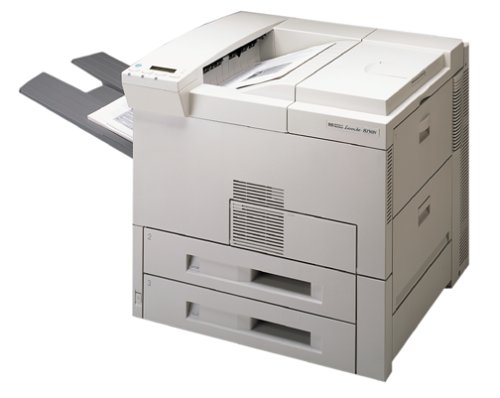



Product Details
Specifications
Accessories
Reviews
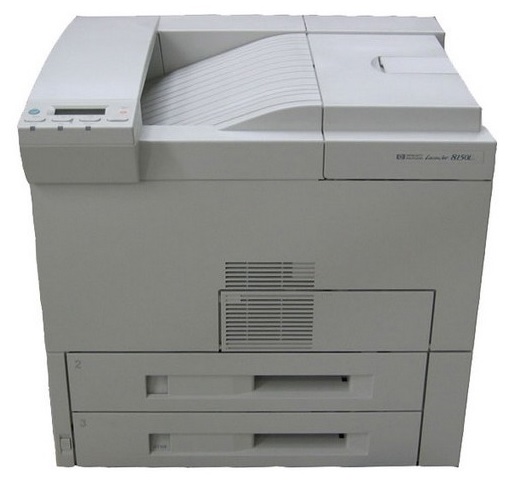
Product Details
Features
- HP LaserJet 8150 web access DIMM
- HP Jetdirect 620n 10/100Base-TX internal print server
- 250 MHz processor
- 32 MB memory
- 2 x 500-sheet input trays
- HP FastRes 1200 (for 1200 dpi quality) at engine speed
- Common interface across PCL 5e/PCL 6
- Edge-to-edge printing
- Postscript level 3 emulation
All our reconditioned printers are clean, tested and working.
Specifications
General Specifications
| General | |
| Printer Type | Workgroup printer - laser - monochrome |
|
Printer |
|
| Printer Speed | Up to 32 ppm - black normal - A4 (8.25 in x 11.7 in) Up to 32 ppm - B/W - Letter A Size (8.5 in x 11 in) Up to 16 ppm - B/W - Ledger B Size (11 in x 17 in) Up to 16 ppm - B/W - A3 (11.7 in x 16.5 in), Up to 32 ppm - black normal - A4 (8.25 in x 11.7 in) Up to 32 ppm - B/W - Letter A Size (8.5 in x 11 in) Up to 16 ppm - B/W - Ledger B Size (11 in x 17 in) Up to 16 ppm - B/W - A3 (11.7 in x 16.5 in) |
| Built in Devices | Status LCD |
| Connectivity Technology | Wired |
| Interface | Parallel, LAN |
| Max Resolution ( B&W ) | 1200 dpi |
| Image Enhancement Technology | HP FastRes 1200 |
| Postscript Support | Standard |
| First Print Out Time B/W | 17 sec |
| Language Simulation | PCL 5E |
| Fonts Included | 80 x TrueType |
| Printer Features | optional duplex |
| Media Handling | 2x 500-sheet input trays |
|
Ram |
|
| RAM Installed ( Max ) | 32 MB / 160 MB (max), 32 MB / 160 MB (max) |
| Technology / Form Factor | SDRAM - DIMM 100-pin, SDRAM - DIMM 100-pin |
|
Media Handling |
|
| Media Type | Bond paper |
| Max Media Size (Custom) | 11.7 in x 17.72 in |
| Media Sizes | B4 (9.83 in x 13.9 in) |
| Envelope Sizes | Monarch (3.87 in x 7.5 in) |
| Media Weight | 60 g/m2 - 199 g/m2 |
| Total Media Capacity | 1100 sheets |
| Media Feeder(s) | 1 x autoload - 100 sheets - 11.7 in x 17.7 in weight: 60 g/m2 - 199 g/m2 1 x autoload - 500 sheets - Legal (8.5 in x 14 in) weight: 60 g/m2 - 105 g/m2 1 x autoload - 500 sheets - 11.7 in x 17 in weight: 60 g/m2 - 105 g/m2, 1 x autoload - 100 sheets - 11.7 in x 17.7 in weight: 60 g/m2 - 199 g/m2 1 x autoload - 500 sheets - Legal (8.5 in x 14 in) weight: 60 g/m2 - 105 g/m2 1 x autoload - 500 sheets - 11.7 in x 17 in weight: 60 g/m2 - 105 g/m2 |
| Max Media Capacity | 3100 sheets |
| Output Trays Capacity | 600 sheets |
|
Duty Cycle |
|
| Monthly Duty Cycle (max) | 150000 pages |
| Printhead Duty Cycle | 20000 pages |
|
Networking |
|
| Networking | Print server - plug-in module |
| Network Controller Name | HP Jetdirect 610n |
| Data Link Protocol | Fast Ethernet |
| Network / Transport Protocol | DLC/LLC |
| Remote Management Protocol | Telnet |
|
Expansion / Connectivity |
|
| Expansion Slot(s) | 3 x EIO 3 x memory - DIMM 100-pin |
|
Miscellaneous |
|
| Microsoft Certifications | Certified for Windows Vista |
| Compliant Standards | EN 61000-4-6 |
|
Power |
|
| Frequency Required | 50/60 Hz |
| Power Consumption Operational | 685 Watt |
| Power Consumption Stand by / Sleep | 165 Watt |
| Compliant Standards | EPA Energy Star |
|
Software/System Requirements |
|
| Software Included | Drivers & Utilities |
| OS Required | Microsoft Windows NT 4.0 |
| Min RAM Size | 32 MB |
| Min Hard Drive Space | 20 MB |
|
Environmental Parameters |
|
| Min Operating Temperature | 50 °F |
| Max Operating Temperature | 91.4 °F |
| Humidity Range Operating | 20-80% |
| Sound Emission | 59 dBA |
| Sound Emission (Idle) | 41 dBA |
| Sound Emission (Operating) | 59 dBA |
|
Dimensions & Weight |
|
| Width | 22.3 in |
| Depth | 21.3 in |
| Height | 20.5 in |
| Weight | 112.4 lbs |
 Download Manufacturer Specifications
Accessories

Reviews


Your printer is not a dumping ground. Don't pile documents or other things on top of it, as they could cause damage. Your printer could overheat and this could result in malfunctioning and even a reduction in the printer's life.
Are you getting diminished color and print quality? If all your images start to look a bit purple, blue or orange, one of your ink wells may be running low. Replace the whole printer ink cartridge, unless you can refill the individual ink wells.
Your ink is not going onto the paper properly or you notice uneven coverage? Try aligning the print heads before you bring out the big guns.
MY ACCOUNT
INFO & POLICIES
SHOP EASY
PAYMENT OPTIONS



