



 Shopping Cart
 HP M4345XS LaserJet Printer RECONDITIONED
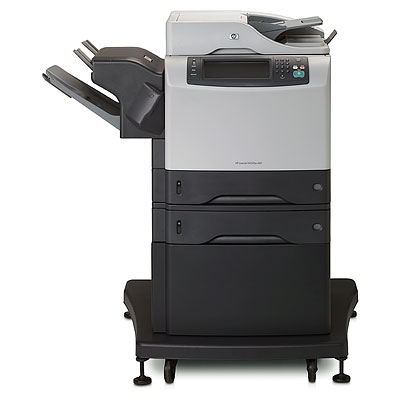

Images are for illustration purposes only and do not necessarily reflect the actual product.
Product Details
Specifications
Accessories
Reviews
Product Details
Main Features
- Print Technology Monochrome Laser (Black and White)
- Multifunction Features Fax / Scanner / Copier / Print
- Duplex (Double Sided Printing) Yes
- Page Per Minute (Black) 45
- Part Number (Q3944A)
- Quantity 1x HP M4345XS
Specifications
General Specifications
| General | |
| Device Type | Fax / copier / printer / scanner |
| Copier Type | Digital |
| Fax Type | Plain Paper |
| Printing Technology | Laser - monochrome |
| Monthly Duty Cycle (max) | 200000 impressions |
|
Memory |
|
| Standard Memory | 256 MB |
| Max Supported Memory | 512 MB |
| Hard Disk Drive | 40 GB |
|
Copying |
|
| Max Copying Speed | Up to 45 ppm |
| Max Copying Resolution | Up to 600 x 600 dpi |
| Max Document Enlargement | 400% |
| Max Document Reduction | 25% |
| Maximum Copies | 1000 |
| Automatic Duplexing | Yes |
|
Printing |
|
| Max Printing Resolution | Up to 1200 x 1200 dpi |
| Max Printing Speed | Up to 45 ppm |
| Printer Drivers / Emulations | PCL 5e, PCL 6, PostScript 3, PDF 1.4 |
| Image Enhancement Technology | HP FastRes 1200 |
| First Print Out Time B/W | 10 sec |
|
Scanning |
|
| Optical Resolution | 600 x 600 dpi |
| Gray Scale Depth | 8 bit |
| Color Depth | 30 bit |
|
Fax Machine |
|
| Compatibility | Super G3 |
| Max Transmission Speed | 33.6 Kbps |
| Data Compression System | JBIG |
| Fax Resolutions | 300 x 300 dpi, 200 x 200 dpi |
|
Fax Machine Features |
|
| Speed Dialing | 100 station(s) |
| Broadcast Transmission | 100 stations |
| Features | Fax forwarding, automatic redialing |
|
Document & Media Handling |
|
| Original Type | Sheets |
| Document Feeder Capacity | 50 sheets |
| Min Media Size | 3 in x 5 in |
| Min Media Size | Legal |
| Min Media Weight | 60 g/m2 |
| Max Media Weight | 200 g/m2 |
| Supported Media Type | Transparencies, envelopes, plain paper, cards, labels, recycled paper, bond paper |
| Standard Media Capacity | 1100 sheets |
| Max Media Capacity | 2100 sheets |
| Output Trays Capacity | 500 sheets |
| Document & Media Handling Details | ADF - 50 sheets Input tray - 100 sheets size: 3 in x 5 in - Legal (8.5 in x 14 in) weight: 60 g/m2 - 200 g/m2 2 x input tray - 500 sheets size: 5.8 in x 8.25 in - Legal (8.5 in x 14 in) weight: 60 g/m2 - 120 g/m2 Stacker - 500 sheets size: 3 in x 5 in - Legal (8.5 in x 14 in) Stapler - 30 sheets size: 3 in x 5 in - Legal (8.5 in x 14 in) |
| Speed Details | Printing : up to 45 ppm ( Letter A ) Copying : up to 45 ppm ( Letter A ) |
|
Finishing Equipment |
|
| Stacker | Included |
| Stapler | Included |
|
Connections |
|
| PC Connection Availability | Yes |
| Interfaces | USB 2.0 LAN |
| Network Protocols | IPX/SPX, AppleTalk, DLC/LLC |
| Operating System Support | MS Windows XP, MS Windows 2000, MS Windows Server 2003, Apple Mac OS X 10.2 or later, MS Windows XP Professional x64 Edition |
|
Power |
|
| Voltage Required | AC 110 V |
| Power Consumption Operational | 830 Watt |
| Power Consumption Standby | 49 Watt |
| Power Consumption Sleep | 16 Watt |
 Download Manufacturer Specifications
Accessories

Reviews


Flashing light on your printer? Each printer has a different reason for a blinking or orange light but in general it is due to a paper jam, an empty paper tray, a printer cartridge problem or a problem with the printer hardware.
Make sure to select the correct paper type for your print job. In general, for more important documents, use thicker paper.
Tight on office space? Consider buying a machine with networking capabilities which will allow multiple users to use one printer.
MY ACCOUNT
INFO & POLICIES
SHOP EASY
PAYMENT OPTIONS



* Images are for illustration purposes only.