



 Shopping Cart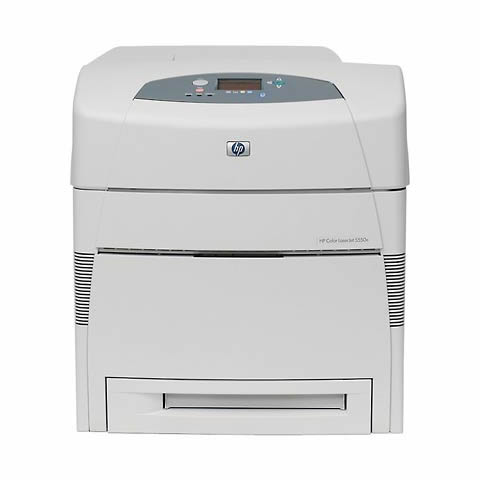



*** ALL TONERS AND SUPPLIES ARE IN STOCK AT DISCOUNTED PRICING , CALL +18882983095..
Printers do not include supplies - toners , drums (Imaging Units) (where applicable) , printer cables , manuals , consumables , trays (where applicable). Power cables are included. Drivers can be downloaded at www.hp.com. Please verify that drivers available are compatible with your software on HP’s site.
Product Details
Specifications
Accessories
Reviews
Product Details
Main Features
 Print Speed: Up to 28 ppm - color - A4 (8.25 in x 11.7 in) ¦ Up to 27 ppm - color - Letter A Size (8.5 in x 11 in) ¦ Up to 28 ppm - B/W - A4 (8.25 in x 11.7 in) ¦ Up to 27 ppm - B/W - Letter A Size (8.5 in x 11 in) ¦ Up to 14 ppm - color - A3 (11.7 in x 16.5 in) ¦ Up to 14 ppm - B/W - A3 (11.7 in x 16.5 in)
Built-in Devices: Status LCD
Connectivity Technology: Wired
Interface: Parallel, USB, Ethernet 10/100Base-TX
Max Resolution ( B&W ): 600 dpi x 600 dpi
Max Resolution ( Color ): 600 dpi x 600 dpi
Image Enhancement Technology: HP ImageREt 3600
PostScript Support: Standard
Language Simulation: PCL 5C, PostScript 3, PCL 6, PDF 1.3
Fonts Included: 80 x PCL ¦ 92 x PostScript 3
Specifications
General Specifications
| Interfaces/Ports | |
|---|---|
| USB | Yes |
|
Display & Graphics | |
| Display Screen Type | LCD |
|
General Information | |
| Manufacturer | Hewlett-Packard |
| Manufacturer Part Number | Q6387A#ABA |
| UPC Code | 829160887425 |
| Brand Name | HP |
| Product Name | Photosmart 385 Photo Printer |
| Marketing Information |
Trust your memories to HP, a proven leader in printing technology. Easily edit photos without a PC, add fun borders, crop and zoom using a 2.5 inch color display that flips up for easy viewing. Get all your 4x6 inch prints from one stylish little printer that weighs less than three pounds and is easy to grab with one hand. Take it to parties or on vacation to make prints where and when you'd like. |
| Product Model | 385 |
| Product Type | Inkjet Printer |
| Manufacturer Website Address | http://www.hp.com |
| Product Line | Photosmart |
| Product Series | 380 |
|
Memory | |
| Memory Card Supported | CompactFlash Type II, SmartMedia, Secure Digital, MMC, Memory Stick, xD-Picture Card |
| Standard Memory | 32 MB |
| Maximum Memory | 32 MB |
| Memory Card Slot | Yes |
|
Miscellaneous | |
| Additional Information |
|
|
Physical Characteristics | |
| Height | 6.5" |
| Width | 8.7" |
| Depth | 8.8" |
| Weight (Approximate) | 41.6 oz |
| Form Factor | Desktop |
|
Media Handling | |
| Media Type | Photo Paper, Index Card, Borderless Media, Photo Card |
| Borderless Printing | Yes |
| Media Handling | 1 x Input Tray 20 Sheet |
| Standard Input Media Capacity | 20 sheets |
| Number of Input/Multipurpose Trays Installed | 1 |
| Media Size | 4" x 6", 4" x 6.50", 4" x 8", Panoramic - 4" x 12" |
|
Power Description | |
| Maximum Power Consumption | 12.20 W |
| Standby Power Consumption | 6.70 W |
| Off-Mode Power Consumption | 5.20 W |
|
Technical Information | |
| Platform Supported | PC, Mac |
| Maximum Print Resolution | 4800 x 1200 dpi |
| Print Color | Color |
| Maximum Photo Print Speed | 45 Second |
|
Fonts & Emulation | |
| Language Emulation | PCL 3 GUI, PML |
Accessories

Reviews


Printer not working? The printer memory could be full and not getting prints or the prints may be stuck in the print queue. Turn-off the printer, wait a few seconds and turn it back on.
Using heavy or stiff paper? Feed the paper one sheet at a time or try placing a sheet of plain copier or bond paper behind a heavy sheet.
Don't be in a rush with your printer as you can easily damage a printer, or even get hurt, if you do not follow the instructions in the user manual.
MY ACCOUNT
INFO & POLICIES
SHOP EASY
PAYMENT OPTIONS



