



 Shopping Cart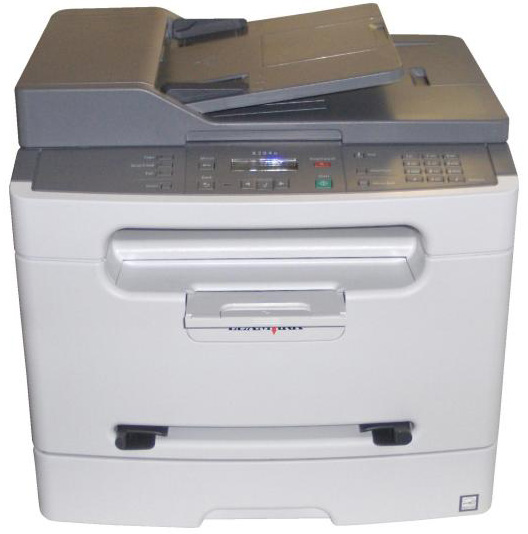



*** ALL TONERS AND SUPPLIES ARE IN STOCK AT DISCOUNTED PRICING , CALL +18882983095.
All reconditioned printers do not include supplies - toners , drums (Imaging Units) (where applicable) , printer cables , manuals , consumables, trays (where applicable). Power cables are included. Drivers can be downloaded from the manufacturers website. Please verify that drivers available are compatible with your software on the manufacturers site.
Product Details
Specifications
Accessories
Reviews
Product Details
Call Copyfaxes for more details
Specifications
General Specifications
| Interfaces/Ports | |
|---|---|
| USB | Yes |
|
Display & Graphics | |
| Display Screen Type | LCD |
|
General Information | |
| Manufacturer | Lexmark International, Inc |
| Manufacturer Part Number | 52G0059 |
| UPC Code | 0734646182256 |
| Brand Name | Lexmark |
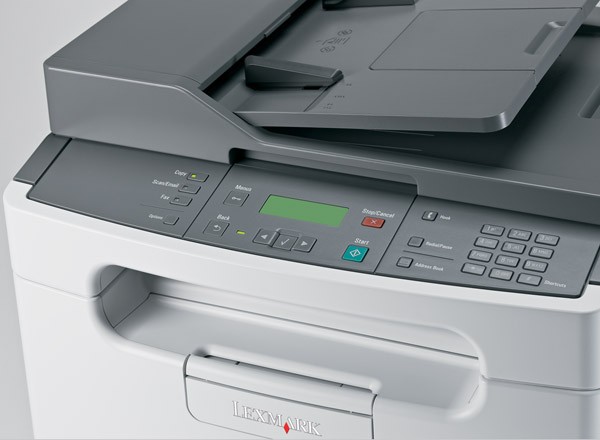
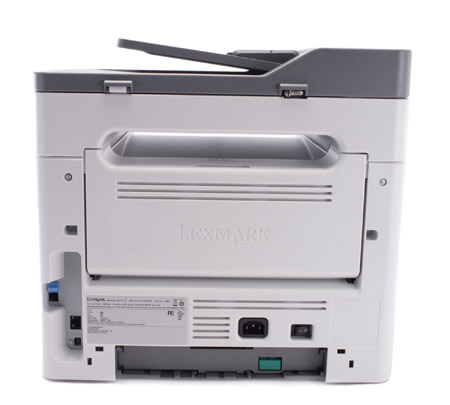
| Product Name | X204N Multifunction Printer |
| Marketing Information |
If you want professional laser quality and performance right on your desktop, then the Lexmark X204N is just for you. Reliable and easy to use, this ultra-compact multifunction printer offers big advantages without a big price tag. |
| Product Model | X204N |
| Product Type | Laser Multifunction Printer |
| Manufacturer Website Address | http://www.lexmark.com |
|
Memory | |
| Standard Memory | 64 MB |
| Maximum Memory | 64 MB |
|
Network & Communication | |
| Ethernet Technology | Fast Ethernet |
| Ethernet | Yes |
|
Physical Characteristics | |
| Height | 15.1" |
| Width | 15.8" |
| Depth | 14.0" |
| Weight (Approximate) | 515.2 oz |
| Form Factor | Desktop |
|
Media Handling | |
| Media Type | Plain Paper, Paper Label, Transparency, Envelope, Card Stock |
| Maximum Input Media Capacity | 250 sheets |
| Media Handling | 1 x Input Tray 250 Sheet, 1 x Automatic Document Feeder 30 Sheet, 1 x Manual Feed Slot 1 Sheet, 1 x Output Bin 150 Sheet |
| Media Size | Letter, Legal, Executive, Statement, Folio, Officio, Envelope No. 10, Envelope No. 7 3/4, Envelope No. 9, B5 Envelope, C5 Envelope, DL Envelope, A4, A5, B5 (JIS) |
| Standard Input Media Capacity | 250 sheets |
| Number of Input/Multipurpose Trays Installed | 1 |
| Number of Input Trays Supported | 1 |
|
Scanning | |
| Optical Resolution | 600 dpi |
| Scanner Type | Flatbed |
| Scan Color | Color |
| Hardware Resolution | 600 x 600 dpi |
|
Processor & Chipset | |
| Processor Speed | 266 MHz |
|
Technical Information | |
| Platform Supported | PC, Mac, SPARC |
| Maximum Mono Print Speed (ppm) | 24 |
| Duplex Printing | Automatic |
| Maximum Print Resolution | 1200 x 1200 dpi |
| Print Color | Monochrome |
| Multifunction Devices | Copier/Fax/Printer/Scanner |
|
Reliability | |
| Duty Cycle | 10000 pages per month |
|
Fonts & Emulation | |
| Language Emulation | PCL 5e, PCL 6, PostScript 3 |
|
Copier | |
| Copier Type | Flatbed |
| Maximum Document Enlargement | 400% |
| Maximum Document Reduction | 25% |
| Maximum Mono Copy Speed (cpm) | 24 |
| Copy Color | Monochrome |
Accessories

Reviews


Most printers have a paper-out detector. On most dot matrix printers it is a photo diode. If form-fed paper is not aligned correctly (usually on the left side) the diode won't see it.
Are your printer nozzles getting clogged? Try adding a humidifier to the room where you keep your printer.
If your print settings are too dark, it could be detrimental to the life of the cartridge in the long run. It’s important that the density control of the machine be properly set to prevent the machine from pulling too much toner into itself.
MY ACCOUNT
INFO & POLICIES
SHOP EASY
PAYMENT OPTIONS



