



 Shopping Cart
 HP 5550HDN Color Laserjet Printer RECONDITIONED
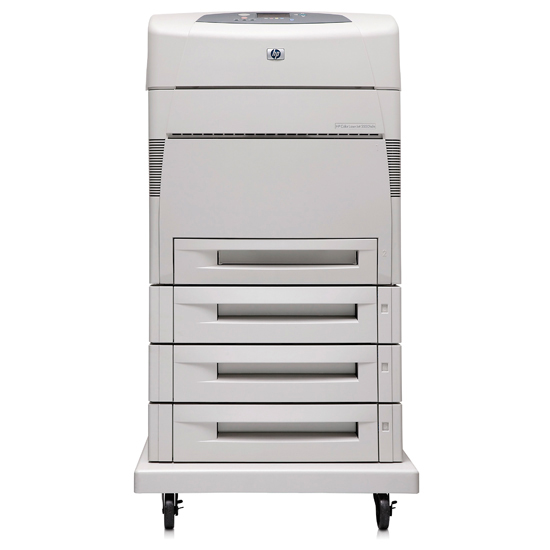



Images are for illustration purposes only and do not necessarily reflect the actual product.
Product Details
Specifications
Accessories
Reviews
Product Details
Main Features
- Print Speed: 27 ppm Black and Color
- Resolution: 600 x 600 dpi
First Page out in 16 seconds - Paper Handling: 2,100 Sheet Paper Capacity Consists of:
1 x 100 Sheet Paper Tray
4 x 500 Sheet Paper Feeder - Printing Features: Auto Duplexer, Wide Format Printing (Up to 12" x 18.5")
- Memory: 288 MB (Expandable to 544 MB), 20 GB Hard Drive
- Connectivity: Parallel, USB, and 10/100 Base-TX Ethernet
- Environments: PC and Mac Compatible
All our reconditioned printers are clean, tested and working.
Specifications
General Specifications
| Interfaces/Ports | |
|---|---|
| Parallel Port | Yes |
|
Storage | |
| Storage Size | 20 GB |
|
General Information | |
| Manufacturer | Hewlett-Packard |
| Manufacturer Part Number | Q3717A |
| UPC Code | 43212105 |
| Brand Name | HP |
| Product Name | LaserJet 5550HDN Printer |
| Product Model | 5550hdn |
| Manufacturer Website Address | http://www.hp.com |
| Product Line | LaserJet |
|
Memory | |
| Memory Card Supported | CompactFlash (CF) |
| Standard Memory | 288 MB |
| Memory Technology | DDR SDRAM |
| Memory Card Slot | Yes |
|
Miscellaneous | |
| Additional Information |
Custom Media Sizes:
|
|
Network & Communication | |
| Ethernet Technology | Fast Ethernet |
| Ethernet | Yes |
|
Physical Characteristics | |
| Form Factor | Desktop |
|
Media Handling | |
| Media Handling | 1 x Multipurpose Tray, 4 x Input Tray, 1 x Output Bin |
| Number of Input/Multipurpose Trays Installed | 5 |
| Media Size | A3, A4, A5, B4 (JIS), B5 (JIS), Custom Size |
|
Technical Information | |
| Platform Supported | PC, Mac, SPARC |
| Maximum Mono Print Speed (ppm) | 28 |
| Maximum Color Print Speed (ppm) | 28 |
| Duplex Printing | Automatic |
| Maximum Print Resolution | 600 x 600 dpi |
| Print Color | Color |
 Download Manufacturer Specifications
Accessories

Reviews


Handle inkjet papers like photographic papers - hold them by the edges to avoid oil deposits and fingerprints.
Paper jam? The best way to remove jammed paper is to gently pull the paper in the direction of the paper path - with power off, of course. Do not pull the paper backwards - you could damage your printer forever by doing so.
Be sure that you are printing on the 'right' side of the paper - that is - the coated side.
MY ACCOUNT
INFO & POLICIES
SHOP EASY
PAYMENT OPTIONS



* Images are for illustration purposes only.