



 Shopping Cart
| networking | wired |
|---|---|
| maximum black and white print speed | 30 ppm |
| maximum black and white copy speed | 30 ppm |
| compatible toner/ink | Lexmark E260X22G; Lexmark X264A11G; Lexmark X264H11G; Lexmark X463A11G; Lexmark X463H11G; Lexmark X463X11G |
| flatbed/sheetfed | flatbed |
| total paper tray capacity | 250 sheets |
| automatic document feeder capacity | 50 sheets |
| auto double-sided printing | yes |
| memory card reader | no |
| maximum monthly volume | 50,000 sheets |
| maximum black and white print resolution | 1200 x 1200 dpi |
| maximum black and white copy resolution | 1200 x 1200 dpi |
| scanner optical resolution | 600 x 600 dpi |
| fax transmission speed | 3 spp (33.6 Kbps) |
| PC faxing capability | yes |
| maximum copy reduction | 25% |
| maximum copy enlargement | 400% |
| maximum sheet size | 8 1/2" x 14" |
| connector type | Ethernet; USB 2.0 |
| operating system compatibility | Windows 2000; Windows XP; Windows Vista; Windows 7; Mac OS 9; Mac OS X |
| dimensions | 17.3"H x 16.8"W x 16"D |
| model | X264dn |
| brand name | Lexmark |
| manufacturer | Lexmark |
| Ecolabel | ENERGY STAR |
| inkjet/laser | laser |
| memory | 64 MB |
| number of paper trays | 1 |
Lexmark X264DN MultiFunction Laser Printer RECONDITIONED
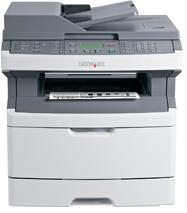

*** ALL TONERS AND SUPPLIES ARE IN STOCK AT DISCOUNTED PRICING , CALL +18882983095.
All reconditioned printers do not include supplies - toners , drums (Imaging Units) (where applicable) , printer cables , manuals , consumables, trays (where applicable). Power cables are included. Drivers can be downloaded from the manufacturers website. Please verify that drivers available are compatible with your software on the manufacturers site.
Product Details
Specifications
Accessories
Reviews
Product Details
Small Footprint, Big Impact
A speedy 4-in-1 laser thats great for small workgroups and saves resources with two-sided printing and more.
Reliability Meets Efficiency
Do more every workday with fast printing, copying, scanning and faxing speeds.
Speedy Performance
Increase your small workgroups efficiency and success with big-league productivity tools, including rapid output up to 30 ppm"the first page out in as fast as 7.5 seconds.
Quality Across the Board
A robust, high-quality design brings reliability and excellence to every aspect of your multifunction experience"from hands-free scanning and copying to rapid printing and faxing.
Less Training, More Simplicity
Copying and scanning are at your fingertips, and the intuitive backlit operator panel offers two lines of text to guide newcomers through printing and maintenance with ease.
Print Black, Think Green
Reduce energy and printer supplies by consolidating all your document functions into one efficient network device. Choose the high-yield cartridge to conserve resources. Plus, duplex printing and scan to e-mail reduces paper waste.
Specifications
General Specifications
Accessories

Reviews


What is dpi? Dpi is used to describe the resolution number of dots per inch in a digital print. The higher the numbers, the more detailed the print image is.
Save memory on your PC by choosing the Custom option when you install your printer, and picking just the software you want to install.
Most printers have a built-in diagnostics program which can be very useful for troubleshooting problems and test-printing without a computer. They are usually initiated by pressing a button or two while turning on the printer.
MY ACCOUNT
INFO & POLICIES
SHOP EASY
PAYMENT OPTIONS



* Images are for illustration purposes only.