



 Shopping Cart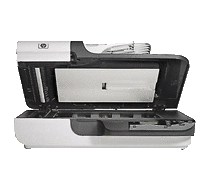

*** ALL TONERS AND SUPPLIES ARE IN STOCK AT DISCOUNTED PRICING , CALL +18882983095..
Printers do not include supplies - toners , drums (Imaging Units) (where applicable) , printer cables , manuals , consumables , trays (where applicable). Power cables are included. Drivers can be downloaded at www.hp.com. Please verify that drivers available are compatible with your software on HP’s site.
Product Details
Specifications
Accessories
Reviews
Product Details
Product Overview:
Quickly scan documents in sizes up to legal"plus photos, pages of books, and bulky items"on our Scanjet N6310 Document Flatbed Scanner. You can automatically scan both sides of a page, plus create shortcuts to save time, and manage your scans with the included software on the N-6310.
Main Features:
- Get professional-quality document scans
- Scan pages of books and magazines, as well as items in binders and other bulky items, on the flatbed scanner
- Get impressive scans of black-and-white and color photos with 2400 dpi and 48-bit color
- Automatically scan both sides of the page
- Scan documents and images fast, at up to 15 pages per minute and 6 images per minute
- Scan up to 500 pages a day
- Speed up common tasks by creating "scan-to" shortcuts
- Find your shortcuts using the shortcut navigation button
- Print copies of scanned images to a default printer with the press of a button
- Preview, edit, rotate, crop, and resize photos with the included software
- Modify and enhance scanned documents with automatic de-skewing, rotating, and cropping
- Save scanned business cards in an easy-to-use format with the included software
- Manage, organize, and share scanned images with the included ScanSoft PaperPort and Presto! PageManager
- Scan and edit text, then save as a Microsoft Word document or PDF file with the included I.R.I.S. Readiris Pro OCR software
- Seamlessly integrate this scanner with your existing systems via the ISIS, TWAIN, and WIA drivers
Specifications
Accessories

Reviews


Sheet-fed scanners scan a stack of pages in sequence whilst your free to get coffee!
In order for your image to come out as sharp as possible, ensure the document is flat against the glass.
If you're in a rush or don't know much about scanning, the auto mode should provide reasonably good quality and may be all you need.
MY ACCOUNT
INFO & POLICIES
SHOP EASY
PAYMENT OPTIONS



