



 Shopping Cart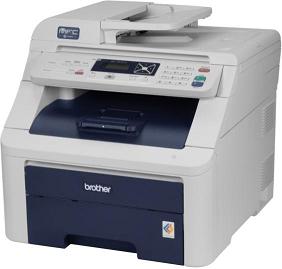

Product Details
Specifications
Accessories
Reviews
Product Details
Product Overview
The Brother MFC 9010CN is a compact and cost-friendly digital color all-in-one solution that combines printing, copying and scanning into one powerful space-saving unit. The MFC9010CN delivers brilliant color output and provides stand-alone copying as well as copy reduction or enlargement from 25-400%. In addition, the Brother MFC 9010-CN All-in-One offers high-quality color scanning and supports a variety of scan-to features. This all-in-one also offers flexible connectivity with Ethernet and Hi-Speed USB 2.0 interfaces.
Main Features
Fast printing and copying.
Helps increase your productivity with a print and copy speed of up to 17ppm.
Brilliant, high-quality color and black output.
Produce vibrant colorful presentations, brochures and flyers up to 600 x 2400 dpi resolution using Brother's LED print technology.
Compact footprint.
With its space-saving design, it can virtually fit in any environment.
Large paper capacity.
Equipped with an adjustable 250-sheet capacity letter/legal paper tray, it also includes a single-sheet manual feed slot for envelopes or thicker media.
High-quality color scanning.
Up to 19200 dpi (interpolated), with a variety of "scan-to" features.
Flexible connectivity.
Includes a built-in Ethernet network interface for sharing with others or connect locally to a single computer via USB.
All our reconditioned printers are clean, tested and working.
Specifications
Accessories

Reviews


Flashing light on your printer? Each printer has a different reason for a blinking or orange light but in general it is due to a paper jam, an empty paper tray, a printer cartridge problem or a problem with the printer hardware.
What is RAM? RAM or Buffer Memory holds the graphic information on the printer while the file is on its way to be printed. The larger the RAM, the faster the printer can print complex graphics.
Are you getting diminished color and print quality? If all your images start to look a bit purple, blue or orange, one of your ink wells may be running low. Replace the whole printer ink cartridge, unless you can refill the individual ink wells.
MY ACCOUNT
INFO & POLICIES
SHOP EASY
PAYMENT OPTIONS



