



 Shopping Cart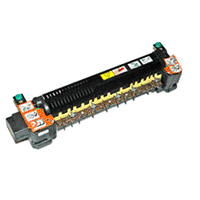

All reconditioned printers do not include supplies - toners , drums (Imaging Units) (where applicable) , printer cables , manuals , consumables, trays (where applicable). Power cables are included. Drivers can be downloaded . Power cables are included.
Images are for illustration purposes only and do not necessarily reflect the actual product.Product Details
Specifications
Accessories
Reviews
Product Details
12G4184 - Fuser Assembly for Lexmark W820 ,X820, X830, X832,IBM InfoPrint 1145, 110 Volt
Specifications
Accessories

Reviews




Out of a color cartridge? Many printer drivers include an option to print using black only, or equivalent options to override the refusal to print.
Your ink is not going onto the paper properly or you notice uneven coverage? Try aligning the print heads before you bring out the big guns.
Pages per minute (ppm) is the average print speed for black and white pages only. Actual speed may be different based on the amount of graphics on each page.
MY ACCOUNT
INFO & POLICIES
SHOP EASY
PAYMENT OPTIONS



