



 Shopping Cart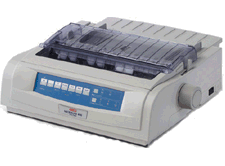

Product Details
Specifications
Accessories
Reviews
Product Details
Overview
Whether you need regular output of continuous multi-part forms, fine business correspondence - or combinations of both - 24-pin OKI ML490/491 printers are the single solution. They handle the printing needs of the most demanding environments - including point-of-sale, automation and utility applications such as wholesale or retail sales counters, financial departments, and manufacturing or warehouse sites. Yet they also produce letter-quality type and high-resolution graphics for the office and executive suite.
The ML490/491 sport features that give them a strong edge over their predecessors as well as the competition. An internal cooling fan provides continuous airflow for the printhead - maximizing throughput productivity for long, unattended print jobs. Additional feed rollers provide precise forms handling and printed-character placement accuracy. 3-piece top cover provides easy access and unsurpassed break resistance.
The ML490/491 printers run the gamut of paper types and envelopes at lightning speed - reaching 475 cps in Utility/Draft mode and 105 cps in Letter-quality. Their rugged printhead (200 million-character average life expectancy) is made up of powerful samarium magnets and stored-energy pins that deliver precise, sharp characters all the way through to the last page of a 5-part form. The patented OKI closed-loop feedback system assures character placement accuracy. And a zero-tear feature accurately positions continuous forms for a clean tear at the perforation to eliminate wasted stock.
Specifications
- Product Description - OKI Microline 490 - printer - B/W - dot-matrix
- Printer Type - Personal printer - dot-matrix - 24 pin - monochrome
- Max Media Size (Standard) - Roll (10 in)
- Dimensions (WxDxH) - 15.7 in x 13.6 in x 6 in Weight - 16.3 lbs
- Printer Output - 475 char/sec - draft, 420 char/sec - fast draft, 380 char/sec - draft, 126 char/sec - letter
- Max Resolution ( B&W ) - 240 x 216 dpi
- RAM Installed ( Max ) - 128 KB
- Language Simulation - IBM AGM, EPSON LQ, IBM ProPrinter XL24
- Media Type - Envelopes, labels, plain paper, continuous forms, cards
- Power - AC 120 V
- System Requirements - Microsoft DOS, Microsoft Windows NT 4.0, Microsoft Windows 3.x/95/98, Microsoft Windows 2000 / NT4.0
Specifications
| SKU: | 62418903 |
| Print Speed Mono: | 475 |
| Duty Cycle: | 20000 |
| Interfaces: | Standard/Optional/Standard/Standard |
| Pins: | 24 |
| Size: | 15.7 x 13.6 x 6.0N/A |
| Weight: | 16.4N/A |
| Power: | 120v |
Accessories

Reviews


Flashing light on your printer? Each printer has a different reason for a blinking or orange light but in general it is due to a paper jam, an empty paper tray, a printer cartridge problem or a problem with the printer hardware.
Paper jam? The best way to remove jammed paper is to gently pull the paper in the direction of the paper path - with power off, of course. Do not pull the paper backwards - you could damage your printer forever by doing so.
Allow ink to dry completely to avoid smudging. The time will vary based on the ink and paper quality used as well as the temperature and humidity conditions.
MY ACCOUNT
INFO & POLICIES
SHOP EASY
PAYMENT OPTIONS



