



 Shopping Cart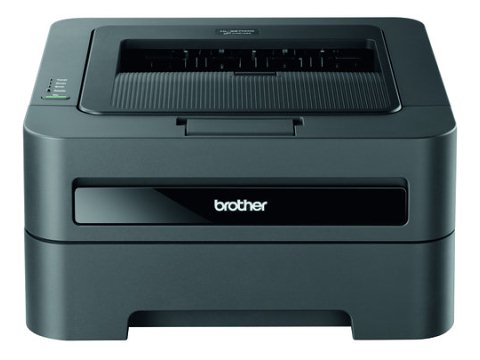

*** ALL TONERS AND SUPPLIES ARE IN STOCK AT DISCOUNTED PRICING , CALL +18882983095.
All reconditioned printers do not include supplies - toners , drums (Imaging Units) (where applicable) , printer cables , manuals , consumables, trays (where applicable). Power cables are included. Drivers can be downloaded from the manufacturers website. Please verify that drivers available are compatible with your software on the manufacturers site.
Product Details
Specifications
Accessories
Reviews
Product Details
Main Features
- Flexible connectivity
- Two-sided printing
- Print speed of up to 27ppm
- Up to 2400 x 600 dpi.
- Convenient mobile device printing
- Adjustable, 250-sheet capacity paper tray
- Stylish, compact design
- Toner Save mode
Specifications
| Print Technology | B/W Laser Technology |
| Max. Black Print Speed (ppm) | 27ppm Black |
| Print Resolution (maximum dpi) | Up to 2400 x 600 dpi |
| Duplex Printing Standard | Yes |
| Standard Paper Capacity (sheets)‡ | 250-Sheet Input Capacity |
| Optional Paper Capacity (sheets) | No |
| Multi-purpose Tray Capacity‡ | Single-sheet manual bypass |
| Standard Interface(s) | Wireless 802.11b/g, 10/100 Base-TX Ethernet, Hi-Speed USB 2.0 |
| Printer Driver Compatibility† | Windows® Mac OS® & Linux |
| Mobile Device Compatibility‡ | Brother™ iPrint&Scan, Cortado Workplace |
| Emulation(s) | GDI, PCL6 |
| Max. Monthly Duty Cycle‡ | 10,000 pages |
| Recommended Monthly Print Volume‡ | 250 to 2,000 pages |
| First Time to Print | Less than 8.5 sec. |
| Standard Memory (MB) | 32MB Memory |
| Optional Memory (MB) | No |
| Network-Ready | Yes |
Accessories

Reviews


Is your printer feeding in the whole paper stack rather than just one piece at a time? Fan the paper before putting it in the tray to help separate the sheets. Also, store your paper in a cool, dry place as humidity can contribute to this problem.
When power is applied, you should hear the print mechanism initialize and most printers have at least one light which will be illuminated when it is on.
Your printer is not a dumping ground. Don't pile documents or other things on top of it, as they could cause damage. Your printer could overheat and this could result in malfunctioning and even a reduction in the printer's life.
MY ACCOUNT
INFO & POLICIES
SHOP EASY
PAYMENT OPTIONS



