



 Shopping Cart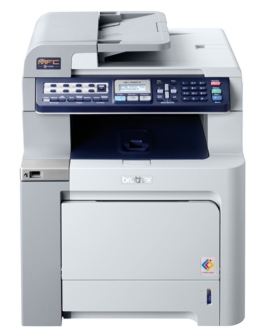

Product Details
Specifications
Accessories
Reviews
Product Details
Professional Color Laser All-in-One for your Small Business or Workgroup
The Brother MFC 9440CN Laser is a network-ready color laser Multi-Function Center that provides a wide range of standard features perfect for any office or business. Produce vivid, rich color documents and copies in-house with the MFC9440CN, without having to outsource printing them.
- Fast color laser printing. Delivers an impressive color and monochrome print speed of up to 21 pages per minute, and copy speeds of up to 17 copies per minute.
- Outstanding print quality. Produce brilliant, colorful presentations, brochures and documents that will give you a competitive edge.
- Flexible connectivity. Install the MFC on a wired or wireless network via Ethernet or connect locally to a single computer via USB.
- Versatile paper handling. A 250-sheet capacity paper tray adjustable for letter or legal paper and a 50-sheet multi-purpose tray for envelopes, labels, letterhead or cardstock.
- Expandable paper capacity. You can increase your total paper capacity to 800 sheets by adding an optional 500-sheet letter/legal paper tray‡.
- High quality color scanning. Use the letter size document glass.
- High-speed faxing. Send and receive faxes quickly in b&w or color using its high speed 33.6K bps fax modem.
- Easily accessible USB Direct Interface. Conveniently print PDF or JPEG files from or scan PDF or JPEG files to a USB flash memory drive. You can also print directly from a PictBridge compatible digital camera.
All our reconditioned printers are clean, tested and working.
Specifications
Accessories

Reviews


Are you getting diminished color and print quality? If all your images start to look a bit purple, blue or orange, one of your ink wells may be running low. Replace the whole printer ink cartridge, unless you can refill the individual ink wells.
Not all drivers are pre-installed on all operating systems and as new operating systems are released, you will need to install drivers yourself. Make sure to consult your printer manual.
When power is applied, you should hear the print mechanism initialize and most printers have at least one light which will be illuminated when it is on.
MY ACCOUNT
INFO & POLICIES
SHOP EASY
PAYMENT OPTIONS



