



 Shopping Cart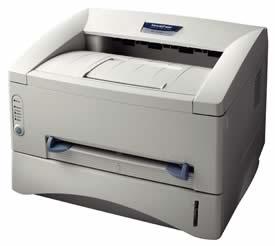

Product Details
Specifications
Accessories
Reviews
Product Details
Overview
Designed for personal or small offices, the award-winning Brother HL-1440 is an affordable, personal laser printer. Delivering compatibility for either Windows or Mac users, the HL1440 features a space-saving compact design that will fit in just about any workspace. The HL 1440 also offers maximum flexibility with PCL4 support to enable DOS printing, a generous 250-sheet paper input capacity to reduce paper refills and an innovative web-based user support system.
All our reconditioned printers are clean, tested and working.
Specifications
Accessories

Reviews


Most printers will beep once or twice during or after initialization. If it beeps more than that or beeps constantly, it is telling you that something is wrong. Most printers beep when out of paper or out of ink.
Preview and proofread your documents on the screen before sending them to print. This will save you a lot of paper and re-printing.
Your ink is not going onto the paper properly or you notice uneven coverage? Try aligning the print heads before you bring out the big guns.
MY ACCOUNT
INFO & POLICIES
SHOP EASY
PAYMENT OPTIONS



