



 Shopping Cart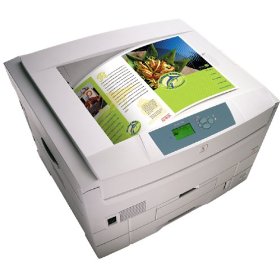

Product Details
Specifications
Accessories
Reviews
Product Details
Overview Of The Xerox Tektronix Phaser 7300N Color Laser Printer RECONDITIONED
The Xerox 7300N printer, as with all our products is cleaned, tested and working, and has passed the clean test copy.
The Phaser 7300 is the fastest color printer in the line up. Imagine the end of clogged print jobs and time consuming waits at the printer. This printer cranks out color at 30 pages per minute (ppm) and black-and-white documents print at 37 ppm.
At 600 dot-per-inch (dpi) resolution, the Phaser 7300 prints sharper text and finer lines-ideal for color drawings, flow charts, schedules, spreadsheets, and marketing materials. The auto-thickness sensor adjusts the fuser temperature to the paper type so you get a consistent look whether you're printing on recycled paper, bond stock, or glossy paper.
The Phaser 7300 uses a 500 MHz processor, which means many employees can use the same printer efficiently and Print on a wide range of paper sizes, including custom paper up to 12" x 36" (banner size).
Main Features Of The Xerox Tektronix Phaser 7300N Color Laser Printer RECONDITIONED
- Processor: 500 Mhz
- Print Speed: Black: 37 ppm / Color: 30 ppm
- First Page Out: Black: 13 ppm / Color: 16 ppm
- Resolution: 2400 dpi
- Connectivity: Ports: Bi-directional Parallel, USB, 10/100Base-TX Ethernet
- Networking: Interface: 10/100Base-TX Ethernet
- Memory: 192 MB RAM (Expandable to 512 MB)
- Paper Handling: Input: 650 Sheet Input Capacity consists: 1 x 550 sheet standard tray, 1 x 100 sheet multipurpose tray, Maximum Capacity: 2,850 sheets with 3 Trays and 1 Feeder.
- Features: Smart trays, Run black, Phaser Installer, Intelligent Ready Embedded Web Server, Remote printing, E-mail alerts, Enhanced PrintingScout, PhaserSMART, Job Accounting, Usage Analysis Tool.
All our reconditioned printers are clean, tested and working.
Specifications
Accessories

Reviews


What is Tray Capacity? Tray Capacity or Paper Capacity is the maximum number of pages that can be stored in the printer before you have to refill it.
Printer not working? Check that the ink and toner are there and properly filled.
Not all drivers are pre-installed on all operating systems and as new operating systems are released, you will need to install drivers yourself. Make sure to consult your printer manual.
MY ACCOUNT
INFO & POLICIES
SHOP EASY
PAYMENT OPTIONS



