



 Shopping Cart
 HP 5 LaserJet Printer RECONDITIONED
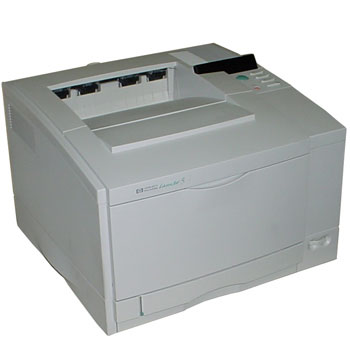

Product Details
Specifications
Accessories
Reviews
Product Details
Main Features
- Fast: 10ppm black,
- 1200-dpi-equivalent image quality
- Monthly Volume of 30,000 pages
- 20MB RAM
- PC Compatible
- Environments: Windows 3.1, 95, 98, NT 4.0
Specifications
General Specifications
| Print Speed Black | 10 ppm |
| Print Colors | Yes |
| Processor | 40 MHz |
| Resolution | 1200 dpi |
| Resolution Technology | HP Image REt 1200 |
| Print Languages | Std. Enhanced HP PCL 5 with Color Opt. Adobe PostScript Level 2 |
| Monthly Volume | 30,000 pages |
| Paper Trays | Std. 1 Max. 2 |
| Input Capacity | Std. 250 sheets Max. 500 sheets |
| Envelope Input | Std. None Max. None |
| Media Sizes | Letter, A4, and executive (legal, tabloid, and A3 for black pages only) |
| Media Types | Plain paper and HP Color LaserJet 5/5M transparency film and glossy paper |
| Duplex Printing | No |
| Memory | Std. 20 MB Max. 84 MB |
| Scalable Typefaces | 35 Intellifont, 10 TrueType [plus 35 Adobe Type 1] |
| Connectivity | Std. IEEE 1284-compliant parallel, 1 open MIO slot, Opt. HP JetDirect 600N internal print servers and third pary interface cards |
| Automatic I/O Switching | Yes |
| Automatic Network Switching | Yes, with optional HP JetDirect internal print servers |
| Dimensions W x D x H | 24.4 x 19.3 x 14.8 in |
Accessories

Reviews


Getting blank pages after you installed a new cartridge? Check that the sticker from the cartridge was properly removed. Alternatively, run the clean print head function to make sure all air bubbles are removed. Do not remove the cartridge once it has been installed.
Set your printer for the proper paper type and weight. Fine art papers are heavier than ordinary inkjet or bond papers so set the printer to thicker paper settings.
Most printers have a built-in diagnostics program which can be very useful for troubleshooting problems and test-printing without a computer. They are usually initiated by pressing a button or two while turning on the printer.
MY ACCOUNT
INFO & POLICIES
SHOP EASY
PAYMENT OPTIONS



* Images are for illustration purposes only.