



 Shopping Cart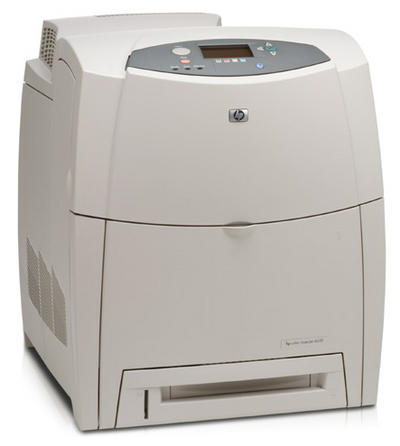

*** ALL TONERS AND SUPPLIES ARE IN STOCK AT DISCOUNTED PRICING , CALL +18882983095..
Printers do not include supplies - toners , drums (Imaging Units) (where applicable) , printer cables , manuals , consumables , trays (where applicable). Power cables are included. Drivers can be downloaded at www.hp.com. Please verify that drivers available are compatible with your software on HP’s site.
Product Details
Specifications
Accessories
Reviews
Product Details
Main Features
- 17 ppm Black and 17ppm Color
- 600 x 600 DPI Resolution
- 96 MB RAM (Expandable to 512 MB)
- Connects Via Parallel and Fast Infrared
- Network ready (RJ45-10/100 Ethernet)
- Environments: Windows 95, 98, Me, NT 4.0, 2000, XP, Mac OS 8.6 or later and Unix
Specifications
General Specifications
| Manufacturer Part # | C9692A |
| Print Technology | In-line color laser, direct-to-page printing |
| Color Control | HP Image REt 2400 with Trapping: Overlapping of colors to prevent white gaps from appearing between edges of objects. Apadtive Halftoning: Increases smoothness of text and graphics while maintaining the quality of the area fills Halo Reduction: Pulls subordinate colors from object edges reducing the halo appearance. |
| Processor | 400 MHz |
| Print Speed Black/Color | 17 PPM |
| First Page Out Black | Ready State: 17.5 seconds Powersave: 18.4 seconds Cold Start or Power-Up: 2 minutes |
| First Page Out Color | Ready State: 17.5 seconds Powersave: 18.4 seconds Cold Start or Power-Up: 2 minutes |
| Resolution | 600 X 600 DPI 2400 DPI Image Quality with HP ImageRET Technology |
| Connectivity Ports | IEEE 1284-compliant bidirectional parallel (with c-type connector) Fast Infrared (FIR) 3 open EIO slots |
| Connectivity Network Ports | Optional HP Jetdirect (EIO) print servers and connectivity card for USB/serial/LocalTalk (Part #: J4135A) Jetdirect 600n internal print server, Ethernet, 802.3 (10Base-T) (Part #: J3110A) Jetdirect 600n internal print server, Ethernet, 802.3 (10Base-T, 10Base2, LocalTalk) (Part #: J3111A) Jetdirect 610n internal print server, Token Ring, 802.5 (Part #: J4167A) Jetdirect 680n EIO, Wireless Ethernet 802.11b (10/100 Base-TX) (Part #: J6058A) |
| Languages and Fonts | HP PCL 5c, HP PCL 6, PostScript 3 emulation |
| Typefaces | 80 TrueType internal scalable in PCL 80 TrueType internal scalable in PS |
| Memory | 96 MB (Expandalbe to 416 MB) 32 MB of on-board 83 MHz Synchronous RAM receive buffer 2 Open Slots Memory options designed specifically for the HP 4600 Series Color LaserJet: Flash DIMM, 4 MB (Part #: C9665A) SDRAM DIMM: 64 MB RAM (Part #: C7878A), 128 MB RAM (Part #: C7850A), 256 MB RAM (Part #: C9653A) |
| Hard Drives | Optional 10 GB (Part #: J6054B) |
| Paper Handling | Input:600 Sheet Input consists of 2 trays: One 100 Sheet Multi-Purpose Tray One 500 Sheet Lower Input Tray Max Input Capacity With All Available Options: 1,100 Sheets Input Options: One 500 Sheet Input Tray (Part #: C9664A) Output: Output Capacity: 250 Sheets |
| Types/Sizes |
Media Types: Paper plain, glossy, film, recycled, envelopes, transparencies, labels, cardstock Media Sizes: Letter, Legal, Executive, no. 10 envelopes, Monarch envelopes Multi-Purpose Tray: 3" X 5" to 8.5" X 14" 500 Sheet Trays: 7.2" X 8.2" to 8.5" X 14" Media Weights: 20 lb |
| Monthly Duty Cycle | 85,000 Sheets. The duty cycle is the maximum recommended number of printed pages per month to ensure long printer life. |
| Dimensions (H X W X D) | Unit 22.8" X 19" X 21.6" |
| Weight | Unit 88.4 lb |
| System Requirements | PC:Windows 95/98, Windows NT, Windows 2000, Windows Me, Windows XP Mac:Mac OS 8.6 + (Through Infrared Connectivity) Other: OS/2, Unix, Linux |
 Download Manufacturer Specifications
Accessories

Reviews


Use a lightly dampened cloth to clean the outside of your laser printer. To clean the inside, use a dry, lint-free cloth to make sure that no liquid enters the inner parts of the printer.
Paper coatings are designed to control ink absorption and spread, producing brilliant, sharp images with less ink.
If debris is the primary cause of failures, toner is the primary cause of debris. All toner cartridges release a small amount of toner powder into the machine. This is why it's important to clean the machine when you change the cartridge.
MY ACCOUNT
INFO & POLICIES
SHOP EASY
PAYMENT OPTIONS



