



 Shopping Cart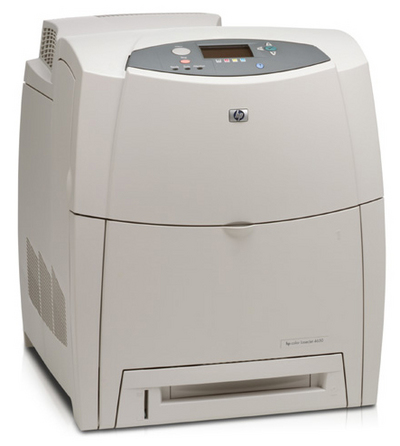

*** ALL TONERS AND SUPPLIES ARE IN STOCK AT DISCOUNTED PRICING , CALL +18882983095..
Printers do not include supplies - toners , drums (Imaging Units) (where applicable) , printer cables , manuals , consumables , trays (where applicable). Power cables are included. Drivers can be downloaded at www.hp.com. Please verify that drivers available are compatible with your software on HP’s site.
Product Details
Specifications
Accessories
Reviews
Product Details
Overview
Print color and black and white pages at up to 17 ppm, with the high-performance vertical in-line laser engine. Achieve fast 18-second first page out from "Ready" and "Powersave" mode due to inductive heat fuser technology also reducing power consumption. Enjoy excellent print quality with ImageREt 2400, new formulas of second-generation, chemically grown toner and direct to paper printing for professional documents. The HP Color LaserJet 4600 series is designed to be easy to use, manage and maintain, and deliver worry-free color laser printing. Graphical control panel provides toner level gauges at a glance and displays text and animated graphics for quick and easy troubleshooting. One point of access at the front and clear labeling make consumables installation very simple. HP Web Jetadmin and an embedded Web server ensure easy management with other HP LaserJet printers and makes remote management simple and convenient. Implement new printing e-services to run downloadable Java-based programs using the embedded virtual machine.
Main Features
Specifications
General Specifications
| General | |
| Printer Type | Workgroup printer - laser - color |
|
Printer |
|
| Print Speed | Up to 16 ppm - B/W - A4 (8.25 in x 11.7 in) Up to 16 ppm - color - A4 (8.25 in x 11.7 in) Up to 17 ppm - B/W - Letter A Size (8.5 in x 11 in) Up to 17 ppm - color - Letter A Size (8.5 in x 11 in), Up to 17 ppm - B/W Up to 17 ppm - color |
| Built in Devices | Status LCD |
| Connectivity Technology | Wired |
| Interface | Parallel, LAN, Parallel, LAN, IrDA |
| Max Resolution | 600 dpi |
| Image Enhancement Technology | HP ImageREt 2400 |
| Automatic Duplexing | Yes |
| Postscript Support | Standard |
| Language Simulation | Poscript3 |
| Fonts Included | 80 x TrueType, 80 x PCL |
|
Ram |
|
| Ram Installed Max | 96 MB / 512 MB (max) |
| Technology / Form Factor | SDRAM |
|
Media Handling |
|
| Media Type | Glossy paper |
| Max Media Size (Custom) | 8.5 in x 14 in |
| Media Sizes | Letter A Size (8.5 in x 11 in) |
| Envelope Sizes | International B5 (6.93 in x 9.83 in) |
| Total Media Capacity | 600 sheets |
| Media Feeder(s) | 1 x autoload - 500 sheets - Legal (8.5 in x 14 in) weight: 60 g/m2 - 105 g/m2 2 x autoload - 100 sheets - Legal (8.5 in x 14 in) weight: 60 g/m2 - 163 g/m2 |
| Max Media Capacity | 1100 sheets |
|
Duty Cycle |
|
| Monthly Duty Cycle (max) | 85000 pages |
|
Networking |
|
|
Networking |
Print server - plug-in module |
|
Data Link Protocol |
Fast Ethernet |
| Network / Transport Protocol | IPX/SPX |
| Remote Management Protocol | HTTP |
|
Expansion/Connectivity |
|
|
Expansion Slot(s) |
3 x EIO 4 x memory - DIMM 168-pin 1 x memory - DIMM 100-pin |
| Connections | 1 x parallel - 36 pin mini-Centronics 1 x LAN - RJ-45 1 x IrDA - IrDA |
|
Miscellaneous |
|
| Features | LCD Display |
| Microsoft Certifications | Certified for Windows Vista |
| Compliant Standards | VCCI |
|
Power |
|
| Power Device | Power supply - internal |
| Frequency Required | 50/60 Hz |
| Compliant Standards | cUL |
|
Software/System Requirements |
|
| Software Included | Drivers & Utilities |
| OS Required | Microsoft Windows 2000 |
| Min RAM Size | 64 MB |
| Min Hard Drive Space | 180 MB |
| Peripheral / Interface Devices | CDROM |
|
Environmental Standards |
|
| ENERGY STAR | Yes |
|
Environmental Parameters |
|
| Min Operating Temperature | 50 °F |
| Max Operating Temperature | 86 °F |
| Humidity Range Operating | 30-70% |
| Max Altitude Operating | 8530 ft |
| Sound Emission | 65 dBA |
|
Dimensions & Weight |
|
| Width | 18.9 in |
| Depth | 20 in |
| Height | 22.6 in |
| Weight | 81.6 lbs |
 Download Manufacturer Specifications
Accessories

Reviews




Preview and proofread your documents on the screen before sending them to print. This will save you a lot of paper and re-printing.
Most printers have a built-in diagnostics program which can be very useful for troubleshooting problems and test-printing without a computer. They are usually initiated by pressing a button or two while turning on the printer.
Allow ink to dry completely to avoid smudging. The time will vary based on the ink and paper quality used as well as the temperature and humidity conditions.
MY ACCOUNT
INFO & POLICIES
SHOP EASY
PAYMENT OPTIONS



