



 Shopping Cart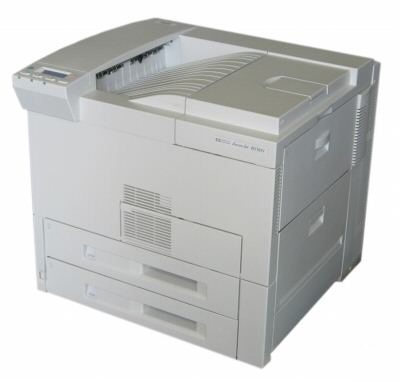

Product Details
Specifications
Accessories
Reviews
Product Details
Overview
Buy HP LaserJet 8100 series printer for its performance. Love it for its versatility. If you've been looking for a 32 page-per-minute (ppm) printer with HP quality, innovation and reliability, your search is over. Because HP LaserJet 8100 series printers offer high-volume users unrivalled performance, versatility and manageability.
As the performance leaders in the HP LaserJet printer family, HP LaserJet 8100 series printers incorporate the sophisticated technologies of HP LaserJet 4000, 5000 and 8000 series printers. HP LaserJet 8100 series printers also include a host of new security, management and convenience features that ensure fast, great-looking output with an overall low total cost of ownership.
Main Features
- Ram Size: 16MB
- Processor: 166 Mhz
- Duty Cycle Per Month: 150000 Pages
- Speed 32 ppm
- First Page Out: 17 Secs
- Resolution 1200 dpi
- Three Paper Trays (Tray three prints 11X17).
All our reconditioned printers are clean, tested and working.
Specifications
General Specifications
| General | |
| Printer Type | Workgroup printer - laser - monochrome |
| Form Factor | Stationary |
| Enclosure Color | White |
|
Printer |
|
| Printer Speed | Up to 32 ppm - B/W |
| Connectivity Technology | Wired |
| Interface | Parallel |
| Max Resolution ( B&W ) | 1200 dpi |
| Poscript Support | Standard |
| Language Simulation | Postscript 2 |
| Fonts Included | 110 x TrueType |
| Printer Features | Optional Duplex |
|
Processor |
|
| Processor | NEC VR4300 166 MHz |
|
Ram |
|
| Ram Installed Max | 16 MB / 208 MB (max) |
| Technology / Form Factor | SDRAM - DIMM 100-pin |
| Slots Qty | 3 |
| Empty Slots | 3 |
|
Media Handling |
|
| Media Path Type | Straight |
| Media Types | Transparencies |
| Max Media Size (custom) | 11.7 in x 16.5 in |
| Media Sizes | Executive (7.25 in x 10.5 in) |
| Envelope Sizes | International B5 (6.93 in x 9.83 in) |
| Total Media Capacity | 1100 sheets |
| Media Feeders | 1 x autoload - 100 sheets - A3 (11.7 in x 16.5 in) 2 x autoload - 500 sheets - A3 (11.7 in x 16.5 in) |
|
Duty Cycle |
|
| Monthly Duty Cycle max | 150000 pages |
|
Expansion / Connectivity |
|
| Expansion Slot(s) | 3 x EIO |
|
Miscellaneous |
|
| Microsoft Certifications | Certified for Windows Vista |
|
Power |
|
| Frequency Required | 50/60 Hz |
| Power Consumption Operational | 700 Watt |
| Power Consumption Stand by / Sleep | 145 Watt |
| Compliant Standards | EPA Energy Star |
|
Software / System Requirements |
|
| Software Included | Drivers & Utilities |
| OS Required | Microsoft DOS |
|
Environmental Parameters |
|
| Min Operating Temperature | 50 °F |
| Max Operating Temperature | 90.5 °F |
| Humidity Range Operating | 20 - 80% |
| Sound Emission | 59 dBA |
|
Dimensions & Weight |
|
| Width | 20.5 in |
| Depth | 21.3 in |
| Height | 21.9 in |
| Weight | 112.4 lbs |
 Download Manufacturer Specifications
Accessories

Reviews


Set your printer for the proper paper type and weight. Fine art papers are heavier than ordinary inkjet or bond papers so set the printer to thicker paper settings.
Out of a color cartridge? Many printer drivers include an option to print using black only, or equivalent options to override the refusal to print.
Paper jam? The best way to remove jammed paper is to gently pull the paper in the direction of the paper path - with power off, of course. Do not pull the paper backwards - you could damage your printer forever by doing so.
MY ACCOUNT
INFO & POLICIES
SHOP EASY
PAYMENT OPTIONS



