



 Shopping Cart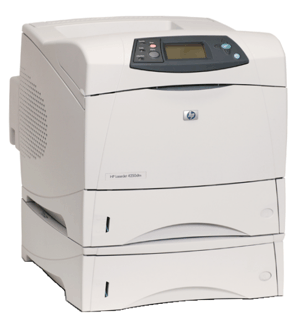

*** ALL TONERS AND SUPPLIES ARE IN STOCK AT DISCOUNTED PRICING , CALL +18882983095.
All reconditioned printers do not include supplies - toners , drums (Imaging Units) (where applicable) , printer cables , manuals , consumables, trays (where applicable). Power cables are included. Drivers can be downloaded from the manufacturers website. Please verify that drivers available are compatible with your software on the manufacturers site.
Product Details
Specifications
Accessories
Reviews
Product Details
Main Features
- The HP Laserjet 4300DTN is built with best-in-class engineering, this series provides worry-free printing and expandability.
- Increase productivity with print speeds up to 45 ppm for letter-size documents
- Customize the base model with optional Jetdirect networking and paper handling and finishing accessories--500- or 1,500-sheet input trays adds to the standard 600-sheet capacity, up to 2,600 sheets.
- A worry-free solution for getting the job done quickly and easily.
- Optional paper finishing stacker or stapler/stacker.
All our reconditioned printers are clean, tested and working.
Specifications
General Specifications
| Speed | Up to 45 ppm |
| First Page Out | 8.5 seconds |
| Typefaces | 80 built-in |
| Print Quality | 1200 dpi |
| Resolution Technology | REt, Ultraprecise toner, ProRes 1200, FastRes 1200 |
| Print Languages, Std | HP PCL 6, PCL 5e, HP Postscript Level 3 emulation, HP-GL/2, PJL |
| Printer Management | HP Web Jetadmin, HP LaserJet Utility, Embedded Web Server |
| Duty Cycle, Monthly | 200,000 pages |
| Media Types | Paper (plain, letterhead, prepunched, bond, color, preprinted, recycled), transparencies, labels, envelopes, card stock, user-defined |
| Media Sizes | Std:Letter, legal, executive, envelopes (no. 10, Monarch) Custom:3 x 5 in to 8.5 x 14 in |
| Connectivity, Std | IEEE 1284-compliant bidirectional parallel, 2 open EIO slots |
| Dimensions (W x D x H) | 16 x 17 x 14 in |
| Weight | 45 lb |
| Model | q2434a |
 Download Manufacturer Specifications
Accessories

Reviews


When power is applied, you should hear the print mechanism initialize and most printers have at least one light which will be illuminated when it is on.
Be sure that you are printing on the 'right' side of the paper - that is - the coated side.
Your printer is not a dumping ground. Don't pile documents or other things on top of it, as they could cause damage. Your printer could overheat and this could result in malfunctioning and even a reduction in the printer's life.
MY ACCOUNT
INFO & POLICIES
SHOP EASY
PAYMENT OPTIONS



