Contact Us
FAQ |
We will match any price
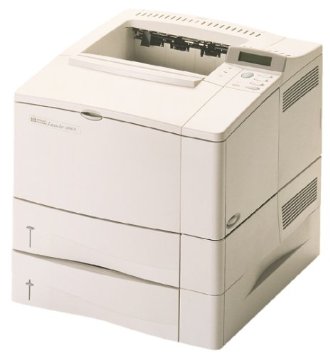
HP 4050T LaserJet Printer RECONDITIONED
*Images may show options not included in price. HP 4050T LaserJet Printer RECONDITIONED customers choose us for our low prices

HP 4050T LaserJet Printer RECONDITIONED

  • Printer
  • 17
  • Monochrome

Model No.:C4252A

Condition:Reconditioned

Availability: Out Of Stock

Shipping:Ask About Free Shipping!

The HP 4050T Printer offers the all the same features as the HP 4050. The HP LJ 4050 T has a additional input sources (one 100-sheet tray plus two 250-sheet trays) lets you print on multiple paper sizes without swapping trays. It's 17-page-per-minute engine guarantees fast output.

1 1 N/A N/A
Product Image HP 4050T LaserJet Printer RECONDITIONED HP 732-832-7744 310 Park Avenue Lakewood, NJ 08701

$725.00

Product Details

Specifications

Accessories

Reviews

Product Details

Overview 

ALL our products are cleaned, tested and working, and pass clean test copy.Manuals and Drivers can be downloaded for FREE from HP.COM. .

Main Features

  • Versatile Paper Handling : 600-sheet standard capacity reduces paper restocking. 
  • Two 32-bit PCI-based Enhanced I/O (EIO) slots deliver faster throughput and greater flexibility.

    Faster Performance: New 17-page-per-minute (ppm) engine

  • 133-MHz RISC processor outperform other laser printers.

  • Instant-on fuser gives 15-second startup, even from Powersave mode.

  • Additional input sources (one 100-sheet tray plus two 250- sheet trays) let you print on multiple paper sizes without swapping trays.

  • Straight-through paper path lets you use a wider variety of paper sizes and weights, and eliminates curling of heavier media and envelopes.

  • HP ProRes 1200 gives you true 1200-dpi output.

  • HP UltraPreciseV toner uses 5-micron particles (less than one-half the size of most other brands) for more accurate dot placement, enhanced grayscale and photo-like quality.

  •  Manual and drivers can be downloaded from HP,s website for free.

  • Superior Print Quality : HP FastRes 1200 (printer default mode) prints 1200-dpi quality at the same speed as 600-dpi and with standard memory.

Specifications

General Specifications

  • Printer Type Workgroup printer - laser - monochrome
    Form Factor  Stationary
    Enclosure Color White


    Printer

     
    Printer Speed Up to 17 ppm - normal
    Connectivity Technology Wired
    Interface

    Parallel, serial


    Max Resolution ( B&W ) 1200dpi
    PostScript Support Standard
    Language Simulation
    • PCL 5E
    Fonts Included 110 x TrueType
    Printer Features Optional Duplex


    Ram

     
    Ram Installed(Max) 8 MB / 200 MB (max)
    Technology / Form Factor SDRAM - DIMM 100-pin
    Slots Qty 3
    Empty Slots 3


    Media Handling

     
    Media Path Type Straight
    Media Type Plain Paper
    Max Media Size (Custom) 8.5 in x 14 in
    Media Sizes Letter A Size (8.5 in x 11 in)
    Envelope Sizes International B5 (6.93 in x 9.83 in)
    Total Media Capacity 600 sheets
    Media Feeder(s)  2 x autoload - 250 sheets - Legal (8.5 in x 14 in)
    1 x autoload - 100 sheets - Legal (8.5 in x 14 in)
    Max Sheets in Multi-Part Form 100


    Duty Cycle

     
    Monthly Duty Cycle (max) 65000 pages
    Cartridge / Printhead Duty Cycle 10000 pages


    Miscellaneous

     
    Compliant Standards Plug and Play


    Power

     
    Frequency Required 50/60 Hz
    Power Consumption Operational 317 Watt
    Power Consumption Stand by / Sleep 21 Watt
    Compliant Standards EPA Energy Star


    Environmental Parameters

     
    Min Operating Temperature 50 °F
    Max Operating Temperature 89.6 °F
    Humidity Range Operating 20 - 80%
    Sound Emission 54 dBA


    Dimensions and Weight

     
    Width 17 in
    Depth 15 in
    Height 15 in
    Weight 50 lbs


Accessories

Reviews

  • Are you getting diminished color and print quality? If all your images start to look a bit purple, blue or orange, one of your ink wells may be running low. Replace the whole printer ink cartridge, unless you can refill the individual ink wells.

  • Make sure to keep your printer up to date by downloading drivers and patches from the manufacturer's site. Most manufacturers provide driver updates for their units which include patches that add fonts or fix incompatibilities.

  • Handle inkjet papers like photographic papers - hold them by the edges to avoid oil deposits and fingerprints.

* Images are for illustration purposes only.