



 Shopping Cart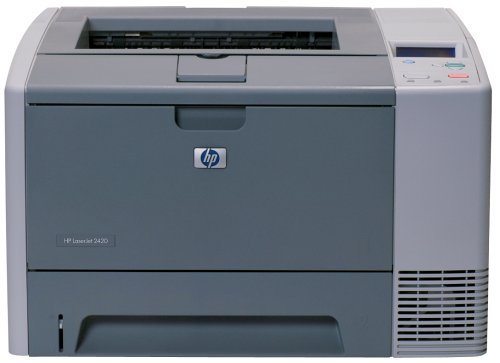



*** ALL TONERS AND SUPPLIES ARE IN STOCK AT DISCOUNTED PRICING , CALL +18882983095.
All reconditioned printers do not include supplies - toners , drums (Imaging Units) (where applicable) , printer cables , manuals , consumables, trays (where applicable). Power cables are included. Drivers can be downloaded from the manufacturers website. Please verify that drivers available are compatible with your software on the manufacturers site.
Product Details
Specifications
Accessories
Reviews
Product Details
Overview
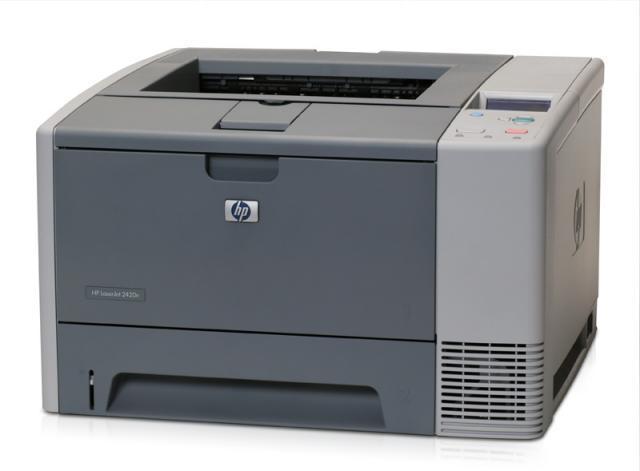
The HP LaserJet 2420dn offers a lot more capability than you might expect from its small size. Weighing in at just 33.5 pounds and taking up just 10.2 by 16.7 by 15.7 inches (HWD), it's light enough for one person to move around and small enough to sit on your desk. But inside the box is a 30-page-per-minute (ppm) engine that cranks out paper faster than most other printers, including some with faster engine ratings.
Main Features
- First page out in 10 seconds
- Print Speed: Up to 30 ppm Black
- Resolution: Up to 1200 x 1200 dpi
- Paper Handling: 350 Sheet Input Capacity Consists of:
- 1 x 100 Sheet Multipurpose Tray
- 1 x 250 Sheet Input Tray
- Printing Features: Auto Duplexer
- Connectivity: USB, Parallel, and 10/100 Base-TX Ethernet
- Environment: Mac and PC Compatible
- Memory: 64 MB (expandable to 320 MB)
Specifications
General Specifications
| Quick Glance | |
|---|---|
| Functions | Printer |
| Printer Type | Monochrome Laser Printer |
| Interface Connection | USB Yes, Parallel Yes, Network RJ-45 Yes |
| Included Network Card | Fast Ethernet |
| System Type | PC, Mac |
| Black & White Print Speed | 30 ppm |
| Green Compliance | RoHS |
| Media Handling | |
|---|---|
| Media Size | Letter, Legal, Executive, 3" x 5", 8.50" x 14" |
| Standard Input Sheet Capacity | 350 sheets |
| Paper Handling Support | Envelope, Plain Paper, Preprinted Paper, Letterhead, Pre-punched Paper, Bond Paper, Recycled Paper, Color Paper, Rough Paper, Transparency, Label, Card Stock |
| General | |
|---|---|
| Monthly Duty Cycle | 75000 pages per month |
| General Features | Automatic Duplex Printing |
| Slots | CompactFlash |
| Dimensions | |
|---|---|
| Height | 10.2 in |
| Width | 16.7 in |
| Depth | 15.7 in |
| Weight | 36.00 lbs |
| Additional Specifications | |
|---|---|
| Black & White Horizontal Resolution | 1200 dpi |
| Voltage Supported | 110 V, 115 V, 120 V |
| Dimensions | 10.20" Height x 16.70" Width x 15.70" Depth |
| Printer Language(s) Supported | HP PCL 5e, HP PCL 6, PostScript Level 3 |
| Media Sizes Accepted | Sheet - US 3" x 5", Sheet - US Executive (7.25" x 10.5"), Sheet - US Legal (8.5" x 14"), Sheet - US Letter (8.5" x 11") |
| Max Sheet Capacity | 350 |
| Processor Speed | 400 MHz |
| Print Resolution | 1200 x 1200 dpi |
| Automated Duplex Printing | Automatic |
| Black & White Vertical Resolution | 1200 dpi |
| Installed Memory | 64 MB |
 Download Manufacturer Specifications
Accessories

Reviews


Set your printer for the proper paper type and weight. Fine art papers are heavier than ordinary inkjet or bond papers so set the printer to thicker paper settings.
Are you getting diminished color and print quality? If all your images start to look a bit purple, blue or orange, one of your ink wells may be running low. Replace the whole printer ink cartridge, unless you can refill the individual ink wells.
Make sure to select the correct paper type for your print job. In general, for more important documents, use thicker paper.
MY ACCOUNT
INFO & POLICIES
SHOP EASY
PAYMENT OPTIONS



