



 Shopping Cart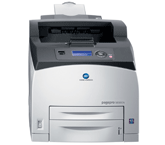

Product Details
Specifications
Accessories
Reviews
Product Details
Overview
Speed your black and white printing with a pagepro 5650 from Konica Minolta. Engineered for superior productivity, the 5650 provides a first page out in as fast as 9.5 seconds and following pages at 45 ppm. Its Emperon printer architecture and advanced 500 MHz processor keep print jobs moving efficiently. Advanced functions, such as direct print and secure print services, are supported by an optional 40 GB hard drive.
-
Gigabit Ethernet interface provides a direct line of network communication to PCs, Macs and Linux workstations
-
Multi-protocol support includes TCP/IP v6, IPsec and SSL for the latest in network and security standards.
-
Support for widely-used emulations, including PCL 6, PostScript 3, PDF and XPS, means black and white printing goes off without a hitch.
-
PageScope™ utilities simplify setup and management easily from the desktop.
-
The Konica Minolta pagepro 5650EN offers an immense duty cycle of 200,000 prints per month to serve the most demanding print environments.
-
700-sheet paper input can be maximized to a hefty 1,800 sheets, to save time restocking during large print runs. The printer features a 500-sheet output tray and a 70-sheet face-up output tray that’s perfect for thick stocks and special print runs.
-
A 500-sheet stacker/sorter unit is also available to keep multiple documents in neat order.
-
For paper conservation, use the optional duplex unit and cut paper use in half.
-
Laser black and white printing technology delivers long-lasting printed documents and dependable service for years of office challenges.
Main Features:
-
B&W Laser
-
45 ppm
-
1200 x 1200 dpi
-
128MB RAM
-
Gigabit Ethernet/USB 2.0/Parallel
-
USB 1.1 Host Port
-
Up to 8.5" x 35.4"
-
Compatible with Windows, Mac and Linux
-
150 Sheet mpt Input
-
550 Sheet cst
-
200,000 Max Monthly Duty Cycle
Specifications
Accessories

Reviews


Out of a color cartridge? Many printer drivers include an option to print using black only, or equivalent options to override the refusal to print.
Store your laser printer in a properly ventilated area where temperature and humidity do not change frequently. Avoid areas with heavy dust buildup.
Your ink is not going onto the paper properly or you notice uneven coverage? Try aligning the print heads before you bring out the big guns.
MY ACCOUNT
INFO & POLICIES
SHOP EASY
PAYMENT OPTIONS



