



 Shopping Cart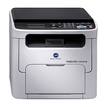

Product Details
Specifications
Accessories
Reviews
Product Details
Designed to be the smallest yet most versatile all in one color personal laser printer, the magicolor 1680MF from Konica Minolta has the ability to produce professional-quality prints, copies and scans at speeds up to 20 ppm B&W and 5 ppm color. This small, multitasking AIO printer is only 14.8" tall, making it the perfect size for your desktop or workspace.
Overview
Print, copy, and scan documents faster with the Konica Minolta magicolor 1680MF all in one color laser printer. This multipurpose, compact, and personal printer features an easy to use control panel and full front access panel making operation and supply replenishment simple. Print 35,000 pages per month at speeds up to 20 ppm B&W and 5 ppm color at vivid 1200 x 600 dpi. Flexible document options on your all in one color laser printer make custom copies possible and scanning to a variety of file formats convenient through a USB 2.0 interface. Ethernet 10/100BaseTX & USB 2.0 connection for network or local use
-
Easy to use and read control panel provides for intuitive operation
-
Rapidly outputs prints at 20 ppm B&W and 5 ppm color; copies at 21 cpm B&W and 3.5 cpm color; and scans at 20 opm B&W and 3.3 opm color
-
Compact design with dimensions of 16.0"W x 16.9"D x 14.8"H fits into small spaces with ease without obstructing your desktop or workspace
-
Simitri HD Toner saves up to 15% more energy and delivers brilliant images and text in color and B&W
Main Features:
Print:
-
Color: 5 ppm
-
B&W: 20 ppm
-
1200 x 600 dpi
-
64MB RAM
-
USB
-
Up to 8.5"x14"
-
Compatible with Windows and Mac
-
200 sheet mpt input
Copy:
-
Color: 5 cpm
-
B&W: 20 cpm
Scan:
-
Color
-
Flatbed
-
600 x 600 dpi
Specifications
Accessories

Reviews


If debris is the primary cause of failures, toner is the primary cause of debris. All toner cartridges release a small amount of toner powder into the machine. This is why it's important to clean the machine when you change the cartridge.
Preview and proofread your documents on the screen before sending them to print. This will save you a lot of paper and re-printing.
Don't be in a rush with your printer as you can easily damage a printer, or even get hurt, if you do not follow the instructions in the user manual.
MY ACCOUNT
INFO & POLICIES
SHOP EASY
PAYMENT OPTIONS



