



 Shopping Cart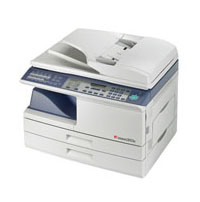

*** ALL TONERS AND SUPPLIES ARE IN STOCK AT DISCOUNTED PRICING , CALL +18882983095..
Printers do not include supplies - toners , drums (Imaging Units) (where applicable) , printer cables , manuals , consumables , trays (where applicable). Power cables are included. Drivers can be downloaded at www.hp.com. Please verify that drivers available are compatible with your software on HP’s site.
Product Details
Specifications
Accessories
Reviews
Product Details
Main Features for the Toshiba E-Studio 203S Digital Copier
- 20 Copies Per Minute
- First Copy Out at 8 Seconds
- Single 250-Sheet Cassette
- 50-Sheet Bypass Tray
- 600 dpi Image Resolution
- Scan Once Print Many
- GDI Printing
- Full Color Scanning
- Optional Network Print/Scan Kit
- Optional Fax Kit
- SRU (Service Replaceable Unit)
- Electronic Sort
- 2 in 1
- Offset Output
- Auto Exposure
- Manual Exposure Control
- Toner Save Mode
- User Simulation
- Energy Star Program
- Continuous Copy Up to 99
Professional installation available - please call for pricing
Specifications
Accessories

Reviews


Before purchasing your copier think about the finishing options you want to include such as collating, stapling or hole punching.
The advantage of a document feeder is that it allows you to feed multiple pages at once as opposed to copying each page individually.
What is a duplexer? A feature allowing your copier to print on both sides of the paper.
MY ACCOUNT
INFO & POLICIES
SHOP EASY
PAYMENT OPTIONS



