



 Shopping Cart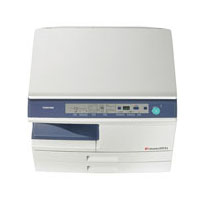

*** ALL TONERS AND SUPPLIES ARE IN STOCK AT DISCOUNTED PRICING , CALL +18882983095..
Printers do not include supplies - toners , drums (Imaging Units) (where applicable) , printer cables , manuals , consumables , trays (where applicable). Power cables are included. Drivers can be downloaded at www.hp.com. Please verify that drivers available are compatible with your software on HP’s site.
Images are for illustration purposes only and do not necessarily reflect the actual product.Product Details
Specifications
Accessories
Reviews
Product Details
Main Features
- 20 Copies Per Minute
- First Copy Out at 8 Seconds
- Single 250-Sheet Cassette
- 50-Sheet Bypass Tray
- 600 dpi Image Resolution
- Scan Once Print Many
- GDI Printing
- Full Color Scanning
- SRU (Service Replaceable Unit)
- 2 in 1
- Offset Output
- Auto Exposure
- Manual Exposure Control
- Toner Save Mode
- User Simulation
- Energy Star Program
- Continuous Copy Up to 99
Professional installation available - please call for pricing
Specifications
Accessories

Reviews


"Consumables" are the supplies which a copier needs to function, such as, paper, toner, ink and developer.
If you need your copier to process multiple tasks simultaneously, you may need to purchase additional memory.
CMYK – This stands for Cyan-Magenta-Yellow-Black which are the four colors of toner that can be used in a copier.
MY ACCOUNT
INFO & POLICIES
SHOP EASY
PAYMENT OPTIONS



