



 Shopping Cart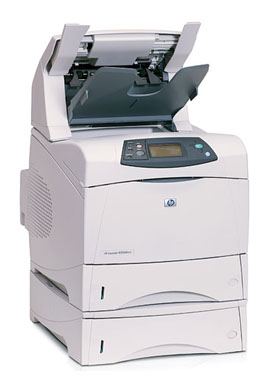

Product Details
Specifications
Accessories
Reviews
Product Details
Main Features
Print Speed: Up to 55 ppm
Resolution: Up to 1200 x 1200 dpi
Paper Handling: 500 Sheet Stapler/Stacker, 1,100 Sheet Input Capacity Consists of:
1 x 100 Sheet Multipurpose Tray
2 x 500 Sheet Input Tray
Printing Features: Auto Duplexer
Memory: 96 MB (expandable to 512 MB)
Connectivity: USB, Parallel, and 10/100 Base-TX Ethernet
Environment: Mac and PC Compatible
Specifications
General Specifications
| Manufacturer Part # | Q5410A#ABA |
| Print Technology Laser | monochrome |
| Processor | 460 MHz |
| Print Speed | 55 ppm |
| First Page Out | 8 seconds |
| Resolution | 1200 x 1200 dpi |
| Connectivity | Standard - Hi-Speed USB 2.0 port, IEEE 1284-B compliant parallel port, 2 open EIO slots, HP Jetdirect Fast Ethernet Embedded Print Server Optional Connectivity - HP Jetdirect EIO internal print servers, HP Jetdirect external print servers, HP wireless print servers, HP Jetdirect EIO conectivity card for USB/serial/LocalTalk, Bluetooth wireless |
| Languages and Fonts | HP PCL 6, HP PCL 5e, HP Postscript Level 3 emulation, direct PDF (v 1.3) printing (with at least 128 MB printer memory) |
| Memory | 96 MB RAM (Expandable to 512 MB) |
| Hard Drives | Optional, 20 GB HP High-performance EIO hard disk |
| Paper Handling | Input - 1,100 Max. Input Capacity - 3,100 Output - 300 Duplexing -Automatic Other Features - Stacker, stapler Types/Sizes - Media Types: Paper (plain, preprinted, letterhead, prepunched, bond, recycled, color, rough), transparencies, labels, envelopes, cardstock, user-defined Media Sizes: Letter, legal, executive, statement, 8.5 x 13 in, envelopes (No. 10, Monarch) Media Weight: 20 lbs. Envelope Feeder - 75 envelope capacity |
| Monthly Duty Cycle | 250,000 Sheets The duty cycle is the maximum recommended number of printed pages per month to ensure long printer life. |
| Power Device | Power supply - internal |
| Power Consumption | 680 Watt (operational), 25 Watt (stand-by) Energy Star compliant |
| Temperature | 50 - 90°F |
| Humidity | 20-80% |
| Dimensions (H X W X D) | 29.1" x 16.5" x 21 " |
| Weight | 80.9 lbs. |
| System Requirements | PC - Microsoft Windows 3.1/DOS, 98, NT 4.0, 2000, Me, XP, Windows Server 2003 Mac - Apple MacOS 9.x, X 10.1 |
Accessories

Reviews


All other things being equal, whiter, brighter paper makes text and line graphics crisper and colors more vibrant.
Are you getting diminished color and print quality? If all your images start to look a bit purple, blue or orange, one of your ink wells may be running low. Replace the whole printer ink cartridge, unless you can refill the individual ink wells.
Are your printer nozzles getting clogged? Try adding a humidifier to the room where you keep your printer.
MY ACCOUNT
INFO & POLICIES
SHOP EASY
PAYMENT OPTIONS



