



 Shopping Cart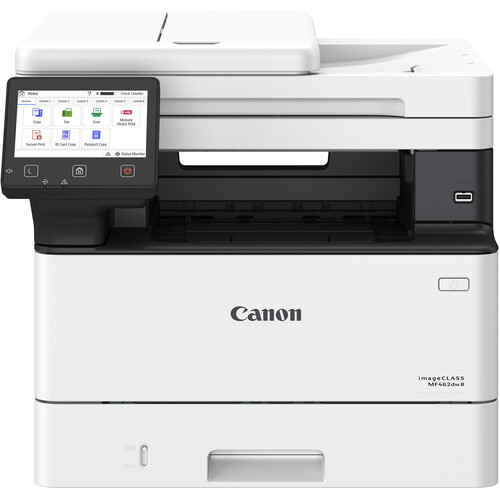

*** ALL TONERS AND SUPPLIES ARE IN STOCK AT DISCOUNTED PRICING , CALL +18882983095.
Printers do not include supplies - toners , drums (Imaging Units) (where applicable) , printer cables , manuals , consumables , trays (where applicable). Power cables are included. Drivers can be downloaded from the manufacturers website. Please verify that drivers available are compatible with your software on the manufacturers site.
Images are for illustration purposes only and do not necessarily reflect the actual product.Product Details
Specifications
Accessories
Reviews
Product Details
Main Features
-
Prints up to 42 pages per minute
-
Scans at speeds up to 70 images per minute (ipm)
-
Automatic duplex printing
-
Wireless connectivity for easy printing from computers and mobile devices.
-
5-inch color touchscreen
-
Printing, scanning, copying, and faxing in one compact unit.
-
Mobile printing via Canon PRINT Business, Apple AirPrint, and Mopria.
-
Energy-saving modes
Specifications
General Specifications
| Functions | |
| Printing Technology | |
| Color Type | |
| Print Resolution | |
| Media Sizes | |
| Scanner Type | |
| Scanner Maximum Resolution | |
| Wireless | |
| Power Source |
| Printing Technology | |
| Color Type | |
| Configuration | |
| Compatible Cartridges | |
| Print Resolution | |
| Borderless Printing | |
| Duplex Printing | |
| Printer Language | |
| Print Speed (By Time) | |
| First Print Out Time | |
| Monthly Duty Cycle |
| Media Handling | |
| Media Sizes | |
| Paper Capacity | |
| Special Media Support |
| Scanner Type | |
| Scanner Maximum Resolution | |
| Scan Modes | |
| Scan Speed | |
| File Formats |
| Copy Speed | |
| Duplex Copying | |
| Copy Resolution |
| Data I/O | |
| Wireless | |
| Direct Printing | |
| Internal Memory | |
| OS Compatibility |
| Display Size | |
| Display Type | |
| Power Source | |
| Battery | |
| Input Power | |
| Power Consumption | |
| Certifications | |
| Dimensions (W x H x D) | |
| Weight |
 Download Manufacturer Specifications
Accessories

Reviews


Are you getting diminished color and print quality? If all your images start to look a bit purple, blue or orange, one of your ink wells may be running low. Replace the whole printer ink cartridge, unless you can refill the individual ink wells.
Use a lightly dampened cloth to clean the outside of your laser printer. To clean the inside, use a dry, lint-free cloth to make sure that no liquid enters the inner parts of the printer.
Be sure that you are printing on the 'right' side of the paper - that is - the coated side.
MY ACCOUNT
INFO & POLICIES
SHOP EASY
PAYMENT OPTIONS



