



 Shopping Cart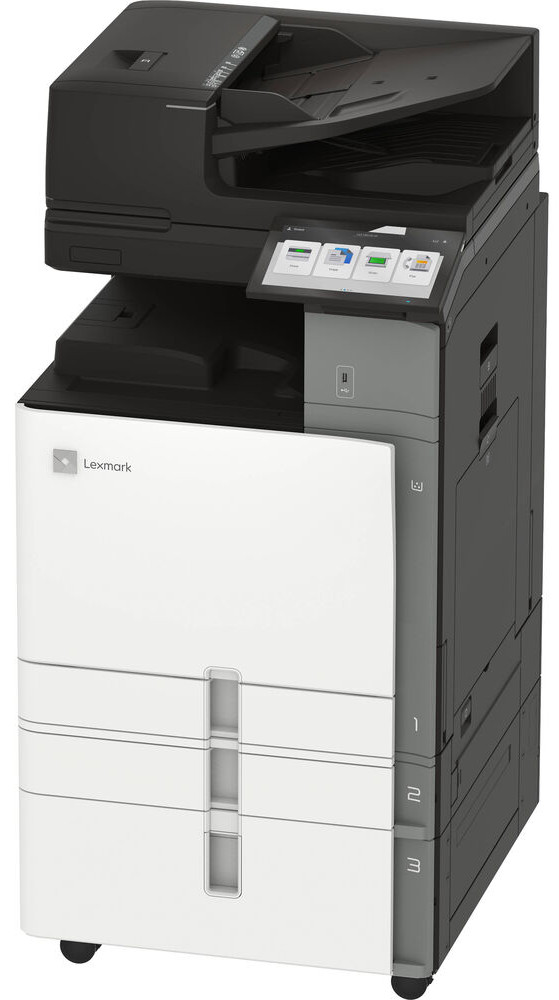



*** ALL TONERS AND SUPPLIES ARE IN STOCK AT DISCOUNTED PRICING , CALL +18882983095.
Printers do not include supplies - toners , drums (Imaging Units) (where applicable) , printer cables , manuals , consumables , trays (where applicable). Power cables are included. Drivers can be downloaded from the manufacturers website. Please verify that drivers available are compatible with your software on the manufacturers site.
Images are for illustration purposes only and do not necessarily reflect the actual product.Product Details
Specifications
Accessories
Reviews
Product Details
Main Features
- Color laser printer
- Functions: Print, scan, copy, and fax
- User-friendly 10 inch color touchscreen
- Speedy printing up to 55 pages per minute
- First page out: As fast as 8.2 seconds
- Flatbed Scanner
- 300 Page automatic document feeder
- Scan area: 11.69 x 17.0 inches
- Maximum input capacity: 4750 pages
- Ethernet and USB Connectivity
- Duplex prints
- Finishing Functions: Offset stacking, Stapling, Hole punching
Specifications
General Specifications
| Part # | 20L8600 |
|---|---|
| Print Technology |
|
| Function |
|
| Workgroup Size |
|
| Display |
|
| Media Sizes Supported |
|
| Included Paper Handling |
|
| Standard Ports |
|
| Size (in. - H x W x D) |
|
| Weight (lb.) |
|
Copying
| Copy Speed |
|
|---|---|
| Copy Speed Duplex |
|
| Time to First Copy |
|
| Reduce / Enlarge Range |
|
Printing
| Print Speed |
|
|---|---|
| Print Speed Duplex |
|
| Time to First Page |
|
| Print Resolution |
|
| Duplex |
|
| Printable Area |
|
Scanning
| Scanner Type / ADF Scan |
|
|---|---|
| Scan Area |
|
| A4/Ltr Simplex Scan Speed |
|
| A4/Ltr Duplex Scan Speed |
|
| Scan Resolution / Optical Scanning Resolution |
|
| Scan File Formats |
|
| Scan Destinations |
|
| ADF |
|
| ADF Paper Input Capacity / ADF Paper Output Capacity |
|
Paper Handling
| Media Types Supported |
|
|---|---|
| Finishing Option |
|
| Number of Paper Inputs |
|
| Paper Input Capacity |
|
| Paper Output Capacity |
|
| Paper Weight Range Supported |
|
| Finishing Functions |
|
| Optional Paper Handling |
|
| Recommended Monthly Page Volume |
|
| Maximum Monthly Duty Cycle |
|
Hardware
| Processor Speed |
|
|---|---|
| Memory |
|
| Hard Disk |
|
| Printer Languages |
|
| Fonts and Symbol Sets |
|
| Touch Screen Display |
|
Connectivity
| Direct USB |
|
|---|---|
| Ethernet Network |
|
| Wireless |
|
| Network Protocol Support |
|
| Network Printing Methods |
|
| Network Management Protocols |
|
| Network Security |
|
| Optional Local Ports |
|
| Optional Network Ports |
|
| Wireless Network |
|
Supported Operating Systems
| Microsoft Windows Operating Systems Supported |
|
|---|---|
| Apple Operating Systems Supported |
|
| Android Operating System Support |
|
| Linux Operating Systems Supported |
|
| Citrix MetaFrame |
|
| Novell Operating Systems Supported |
|
| Other Operating Systems Supported |
|
Electrical & Operation
| ENERGY STAR |
|
|---|---|
| ENERGY STAR Typical Electricity Consumption |
|
| Noise Level |
|
| Duplex Print Noise Level |
|
| Average Power |
|
| Specified Operating Environment |
|
| Product Certifications |
|
Accessories

Reviews


Not all drivers are pre-installed on all operating systems and as new operating systems are released, you will need to install drivers yourself. Make sure to consult your printer manual.
Out of a color cartridge? Many printer drivers include an option to print using black only, or equivalent options to override the refusal to print.
If your print settings are too dark, it could be detrimental to the life of the cartridge in the long run. It’s important that the density control of the machine be properly set to prevent the machine from pulling too much toner into itself.
MY ACCOUNT
INFO & POLICIES
SHOP EASY
PAYMENT OPTIONS



