



 Shopping Cart
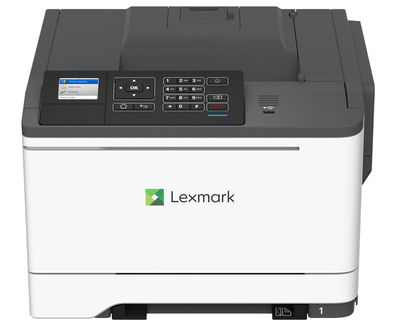
 Lexmark C2535DW Color Laser Printer

Product Details
Specifications
Accessories
Reviews
Product Details
Main Features
- Color, laser printer
- Print Speed: 35 pages per minute
- Integrated duplex prints
- Small footprint
- Lightweight
- Color LCD display panel
- Media Supported: A6, Oficio, 7 3/4 Envelope, 9 Envelope, JIS-B5, A4, Legal, A5, Hagaki Card, Letter, B5 Envelope, Statement, C5 Envelope, Executive, Universal, DL Envelope, Folio, 10 Envelope
- Max Media Input: 1451 sheets
Specifications
General Specifications
| Part # | 42CC160 |
|---|---|
| Print Technology |
|
| Workgroup Size |
|
| Display |
|
| Media Sizes Supported |
|
| Included Paper Handling |
|
| Standard Ports |
|
| Size (in. - H x W x D) |
|
| Weight (lb.) |
|
| Packaged Size (in. - H x W x D) |
|
| Packaged Weight (lb.) |
|
Printing
| Print Speed |
|
|---|---|
| Print Speed Duplex |
|
| Time to First Page |
|
| Print Resolution |
|
| Duplex |
|
| Printable Area |
|
Paper Handling
| Media Types Supported |
|
|---|---|
| Finishing Option |
|
| Number of Paper Inputs |
|
| Paper Input Capacity |
|
| Paper Output Capacity |
|
| Paper Weight Range Supported |
|
| Integrated Tray Card Stock Upper limit |
|
| Optional Paper Handling |
|
| Recommended Monthly Page Volume |
|
| Maximum Monthly Duty Cycle |
|
Hardware
| Processor Speed |
|
|---|---|
| Memory |
|
| Hard Disk |
|
| Printer Languages |
|
| Fonts and Symbol Sets |
|
| Touch Screen Display |
|
Connectivity
| Direct USB |
|
|---|---|
| Ethernet Network |
|
| Wireless |
|
| Network Protocol Support |
|
| Network Printing Methods |
|
| Network Management Protocols |
|
| Network Security |
|
| Optional Network Ports |
|
Supported Operating Systems
| Microsoft Windows Operating Systems Supported |
|
|---|---|
| Apple Operating Systems Supported |
|
| Linux Operating Systems Supported |
|
| Citrix MetaFrame |
|
| Novell Operating Systems Supported |
|
| UNIX Operating Systems Supported |
|
Electrical & Operation
| ENERGY STAR |
|
|---|---|
| ENERGY STAR Typical Electricity Consumption |
|
| Noise Level |
|
| Duplex Print Noise Level |
|
| Average Power |
|
| Specified Operating Environment |
|
| Product Certifications |
|
| UNSPSC Code |
|
| Harmonized Tariff Code |
|
| Country of Origin |
|
 Download Manufacturer Specifications
Accessories

Reviews


Your printer is not a dumping ground. Don't pile documents or other things on top of it, as they could cause damage. Your printer could overheat and this could result in malfunctioning and even a reduction in the printer's life.
What is dpi? Dpi is used to describe the resolution number of dots per inch in a digital print. The higher the numbers, the more detailed the print image is.
Be sure that you are printing on the 'right' side of the paper - that is - the coated side.
MY ACCOUNT
INFO & POLICIES
SHOP EASY
PAYMENT OPTIONS



* Images are for illustration purposes only.