



 Shopping Cart
 Canon ImageRunner ADVANCE C3530i Color MultiFunction Printer
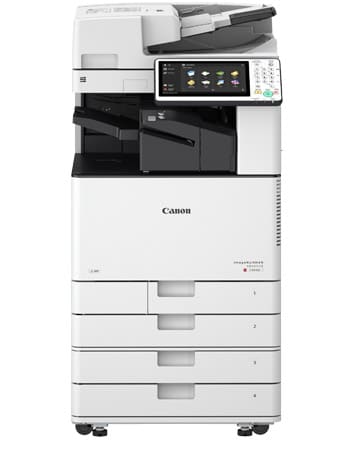


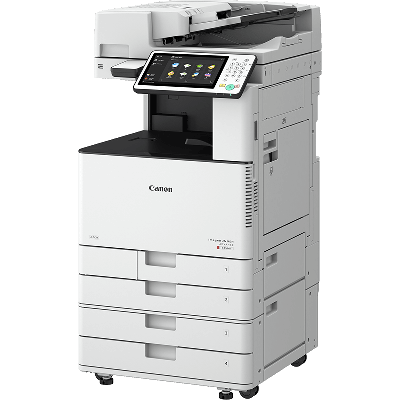
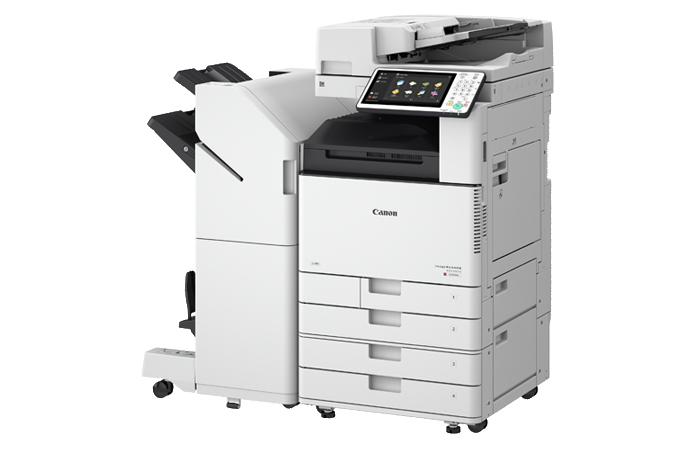

Images are for illustration purposes only and do not necessarily reflect the actual product.
Product Details
Specifications
Accessories
Reviews
Product Details
Main Features
- Print, Copy, Scan, Send, Store, optional fax
- Print speed: 30 ppm (B/W and color)
- Standard paper capacity: 1200 sheets
- Maximum paper capacity: 2300 sheets
- Supports media up to 11" x 17" in various weights
- Various finishing options available
- Single-pass duplex scanner for scan speeds of up to 160 ipm
- Color touchscreen user interface
- Advanced security solutions
- Mobile Solutions
Specifications
General Specifications
| Type | Color Laser Multifunctional |
| Core Functions | Print, Copy, Scan, Send, Store, Fax |
| Processor | Canon Dual Custom Processor (Shared) |
| Control Panel | 10.1" TFT LCD WSVGA Color Flat-panel |
| Memory | 3.0 GB RAM |
| Hard Disk Drive | 250 GB |
Interface Connection |
|
| Network: | 1000Base-T/100Base-TX/10Base-T, Wireless LAN (IEEE 802.11 b/g/n) |
| Others | |
| Standard: | USB 2.0 x1 (Host), USB 3.0 x1 (Host), USB 2.0 x1 (Device) |
| Optional: | Serial Interface, Copy Control Interface |
Paper Capacity (LTR, 20 lb. Bond) |
|
| Standard: | 1200 Sheets |
| Maximum: | 2,300 Sheets |
Paper Sources (LTR, 20 lb. Bond) |
|
| Standard: | Dual 550-sheet Paper Cassettes, 100-sheet Stack Bypass |
| Optional: | Dual 550-sheet Paper Cassettes (CASSETTE FEEDING UNIT-AP1) |
Paper Output Capacity (LTR, 20 lb. Bond) |
|
| Standard: | 250 Sheets |
| Maximum: | 3450 Sheets (with External Finisher and Copy Tray) |
Finishing Capabilities |
|
| Standard: | Collate, Group |
| With Inner Shift Sorter: | Collate, Group, Offset |
| With Inner Finisher: | Collate, Group, Offset, Staple, Staple-Free Staple, Staple On Demand |
| With External Finishers: | Collate, Group, Offset, Staple, Booklet, Staple-Free Staple, Staple On Demand, Hole Punch (Optional) |
Supported Media Types |
|
| Paper Cassettes (1/2): | Thin, Plain, Recycled, Color, Heavy, Pre-punched, Bond, Transparency, Envelope |
| Stack Bypass: | Thin, Plain, Recycled, Color, Heavy, Pre-punched, Labels, Bond, Coated, Transparency, Tracing, Envelope |
| Cassette Feeding Unit-AP1: | Thin, Plain, Recycled, Color, Heavy, Pre-punched, Bond, Transparency |
Supported Media Sizes |
|
| Paper Cassette 1: | Letter, Executive, Statement-R, Envelope [No.10 (COM10), DL, ISO-C5], Custom Size (5-1/2" x 7-1/8" to 11-3/4" x 8-1/2") |
| Paper Cassette 2: | 12" x 18", 11" x 17", Legal, Letter, Letter-R, Executive, Statement-R, Envelope [No.10 (COM10), Monarch, DL], Custom Size (5-1/2" x 7-1/8" to 12" x 18") |
| Stack Bypass: | 12" x 18", 11" x 17", Legal, Letter, Letter-R, Executive, Statement, Statement-R, Envelope [No.10 (COM10), Monarch, DL, ISO-C5], Envelope Custom Size (3-7/8" x 3-7/8" to 12-5/8" x 18"), Custom Size (3-7/8" x 5-1/2" to 12-5/8" x 18"), Free Size (3-7/8" x 5-1/2" to 12-5/8" x 18") |
| Cassette Feeding Unit-AP1: | 12" x 18", 11" x 17", Legal, Letter, Letter-R, Executive, Statement-R, Custom Size (5-1/2" x 7-1/8" to 12" x 18") |
Supported Media Weights |
|
| Cassettes: | 14 lb. Bond to 80 lb. Cover (52 to 220 g/m2) |
| Stack Bypass: | 14 lb. Bond to 110 lb. Cover (52 to 300 g/m2) |
| Duplexing: | 14 lb. Bond to 80 lb. Cover (52 to 220 g/m2) |
Print/Copy Speed (BW and Color) |
|
| C3530i: | Up to 30 ppm (Letter) Up to 20 ppm (Letter-R) Up to 15 ppm (Legal) Up to 15 ppm (11" x 17") |
Warm-up Time |
|
| From Power On: | 34 Seconds |
| From Sleep Mode: | 10 Seconds |
| Quick Startup Mode: | 10 Seconds1 |
| Dimensions (W x D x H) | 22-1/4" x 29-1/4" x 45-1/5"(565 mm x 742 mm x 1148 mm)2 |
Installation Space (W x D) |
|
| Basic: | Stack Bypass + Cassette drawers open: 38-1/2" x 44-1/4" (978 mm x 1123 mm)2 |
| Fully Configured: | 63-3/4" x 44-1/4" (1620 mm x 1123 mm)3 |
| Weight | Approx. 213.9 lb. (97 kg) |
 Download Manufacturer Specifications
Accessories

Reviews


Most printers will beep once or twice during or after initialization. If it beeps more than that or beeps constantly, it is telling you that something is wrong. Most printers beep when out of paper or out of ink.
What is Tray Capacity? Tray Capacity or Paper Capacity is the maximum number of pages that can be stored in the printer before you have to refill it.
Are you getting diminished color and print quality? If all your images start to look a bit purple, blue or orange, one of your ink wells may be running low. Replace the whole printer ink cartridge, unless you can refill the individual ink wells.
MY ACCOUNT
INFO & POLICIES
SHOP EASY
PAYMENT OPTIONS



* Images are for illustration purposes only.